How to Integrate Facebook and Instagram Lead Ads with ZemNeo CRM
A distributor we spoke to last month was running a Facebook lead ad and an Instagram lead ad at the same time. Every morning, someone on the team logged into Meta Ads Manager, downloaded a CSV, and pasted the names into a spreadsheet. By the time a salesperson called back, some leads had already bought from a competitor. Nothing was wrong with the ads. The problem was the gap between the form and the phone call.
This is exactly what lead ads CRM integration fixes. When you connect Facebook and Instagram lead ads to a CRM like ZemNeo, a person who fills out a form on Facebook or Instagram becomes a contact in your system within seconds, gets assigned to a team member, and starts receiving a follow up message automatically. No CSV, no copy paste, no forgotten lead.
In this guide, we will walk through what lead ads CRM integration actually means, how ZemNeo connects to Meta lead ads, the exact steps to set it up, and why real time sync beats a manual CSV download every single time.
What Is Lead Ads CRM Integration, and Why Does It Matter for Facebook and Instagram?
Lead ads CRM integration is the connection between a Facebook Instant Form or an Instagram lead form and the CRM your sales team actually works in. A Meta lead ad collects a name, phone number, and email right inside the app, so a person filling the form on Facebook or Instagram never has to leave the platform or open a new website.
Without this integration, those leads sit inside Meta Ads Manager or the Meta Business Suite lead centre until someone remembers to go pull them out. With lead ads CRM integration turned on, every submission is pushed straight into your CRM as a new contact, and the form fields line up with your CRM fields automatically, so nobody has to retype a phone number by hand.
ZemNeo handles this connection through its dedicated Facebook CRM integration and Instagram CRM integration, so leads from both platforms land in the same place as leads from your website, WhatsApp, or Google Ads.
Why Do Businesses Lose Facebook and Instagram Leads Without a CRM?
Most small businesses do not lose leads because their ads are weak. They lose leads because there is no clear system after the form is filled. One person tracks leads in Excel, another checks Meta Business Suite once a day, and a third relies on memory. Nobody owns the follow up, so leads sit untouched.
We wrote about this exact pattern in our post on CRM account management, where a business spent days just working out who had already been contacted. That kind of confusion is common when Facebook and Instagram leads come in fast but there is no shared record of what happened to each one.
A CRM removes that guesswork. With lead management inside ZemNeo, every Facebook or Instagram lead gets one record, one owner, and one visible status, so your whole team can see exactly where each lead stands.
How Does ZemNeo Connect to Facebook and Instagram Lead Ads?
ZemNeo connects to Meta lead ads in two directions, and the second one is what most CRMs skip.
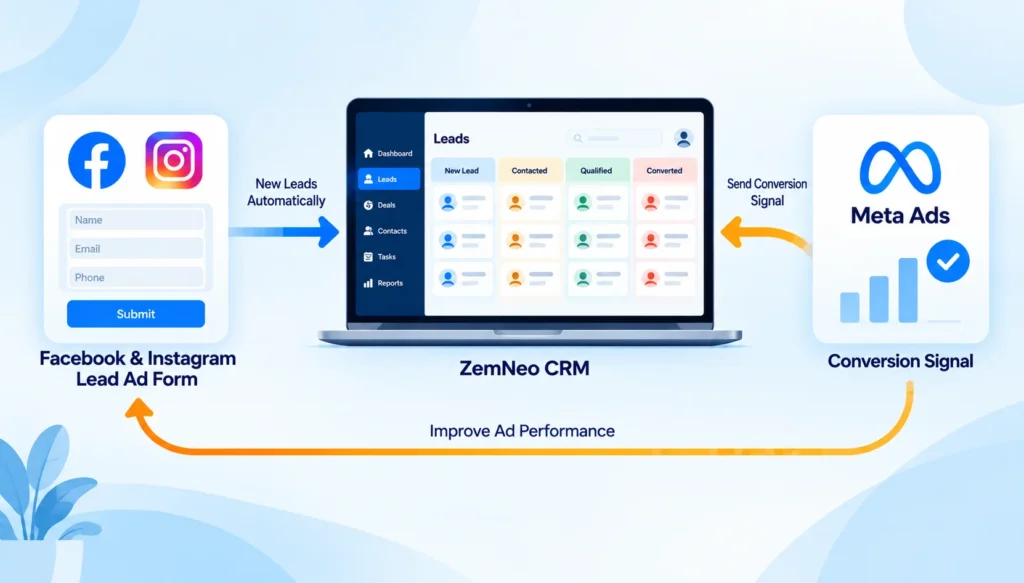
Inbound: the moment someone submits a Facebook Instant Form or an Instagram lead form, ZemNeo picks it up through Meta’s lead retrieval system and creates a matching contact or deal inside your CRM.
Outbound: once your team marks that lead as qualified, interested, or closed inside ZemNeo, that outcome can be sent back to Meta as a conversion event, so Meta’s system learns which leads actually turned into business, not just which forms got filled.
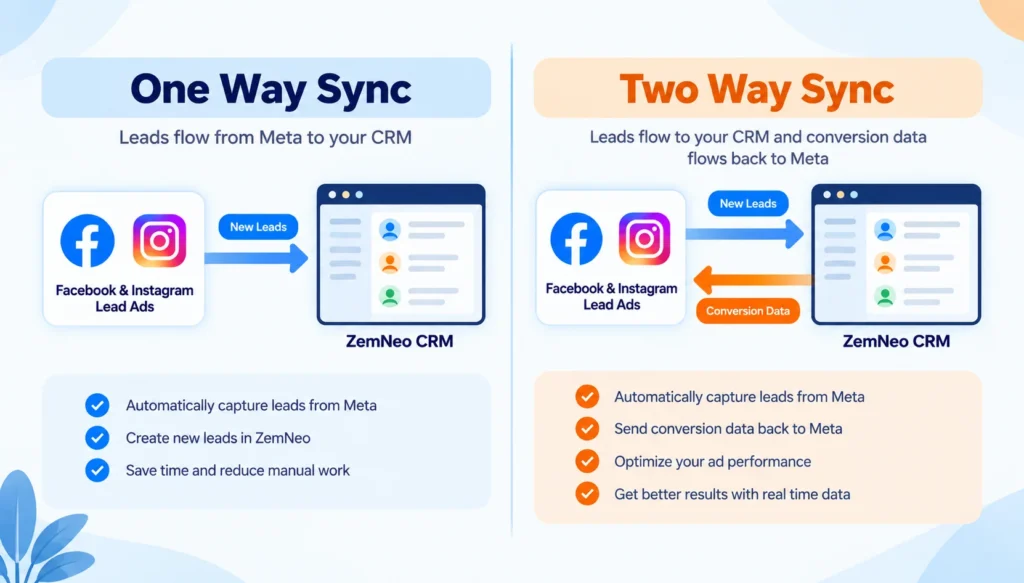
This second part is what a two way CRM sync gives you that a basic one way CRM sync cannot. A one way sync only moves leads in. A full lead ads CRM integration moves leads in and sends a quality signal back out, which over time helps Meta’s algorithm find more people similar to your best customers, not just anyone likely to submit a form.
How to Set Up Facebook and Instagram Lead Ads Integration with ZemNeo CRM
Setting up this integration is a short process once you follow the steps in order.
- Connect your Meta Business Suite account to ZemNeo. This gives ZemNeo permission to see the lead forms attached to your Facebook Page and Instagram account.
- Choose which lead forms to sync. You may be running more than one Facebook lead ad or Instagram lead ad at a time, so pick the ones you want feeding into the CRM.
- Map each form field to a CRM field. Name should map to name, phone should map to phone, and email should map to email. Getting this right matters more than any other step, and we explain why in the next section.
- Set the CRM stage that counts as a qualified lead. This could be “Qualified,” “Interested,” or “Sold,” depending on how your pipeline is built.
- Turn on two way sync. This sends the outcome of each lead back to Meta once your team updates its status.
- Send a test lead. Fill out your own Facebook or Instagram lead ad and confirm it appears inside ZemNeo with every field filled in correctly.
- Turn on automation. Once the integration is confirmed, automation can assign the lead to a team member and fire off a first WhatsApp or SMS message within seconds, without anyone touching a keyboard.
If you want help setting this up, you can book a free demo with ZemNeo and our team will walk through the setup with your ad account.
One Way CRM Sync or Two Way CRM Sync: Which One Should You Choose?
Not every business needs the full two way setup on day one, but it is worth knowing the difference before you decide.
| Method | What It Does | What It Misses |
|---|---|---|
| Manual CSV download | Exports current leads from Meta Ads Manager to a spreadsheet | No real time delivery, no signal sent back |
| One way CRM sync | Pushes new leads into the CRM automatically | The outcome never goes back to Meta |
| Two way CRM sync | Leads flow in, and a quality signal flows back to Meta | Nothing, once field mapping is set up correctly |
If your only goal is to stop losing leads in a spreadsheet, a one way CRM sync solves that on its own. If you are spending real money on Facebook or Instagram ads and want Meta’s algorithm to get smarter over time, a two way CRM sync with the Meta Conversions API is the setup worth building toward.
Why Does Field Mapping Make or Break Your Lead Ads CRM Integration?
Field mapping is the quiet part of lead ads CRM integration that decides whether the whole thing actually works. If the phone number field on your Facebook form does not line up correctly with the phone number field in ZemNeo, that lead can still show up in your CRM, but the match to Meta breaks silently, and no conversion event can be linked back to it.
Phone number and email are the two fields Meta uses to match a lead to a later outcome, so these are hashed using SHA-256 before anything is sent back through the Meta Conversions API for CRM. Hashing means the readable phone number or email never leaves your system, only a scrambled version that Meta can match against its own records. This keeps the process aligned with data rules like the DPDP Act in India and GDPR for businesses working with UAE or European customers.
Before you scale ad spend, it is worth sending a handful of test leads through your CAPI for CRM setup and checking that every field, not just phone and email, arrives correctly.
Real Time Sync Beats a Manual CSV Download, and Here Is Why
Speed decides whether a lead becomes a customer or a missed opportunity. A person who just filled out a Facebook lead ad or Instagram lead ad is thinking about your business right now. That interest fades within hours, and a competitor’s call can land first if yours does not.
A manual CSV download is always a snapshot from the past. By the time someone remembers to export the file, open it, and start calling, the lead has already cooled off. Real time sync removes that gap entirely. The lead lands inside ZemNeo the second the form is submitted, already assigned to someone on your team, ready to be called or messaged while intent is still high.
This is the real reason real time sync matters more than it sounds on paper. It is not about tidy data. It is about reaching a person while they still want to hear from you.
How Does Automation Turn a Lead Ad Submission into a Fast Follow Up?
Once a Facebook or Instagram lead lands inside ZemNeo, automation takes over from there. A new lead can be assigned to the right salesperson automatically, based on rules like location, product interest, or team workload. At the same time, a first message can go out through WhatsApp or SMS, letting the person know their enquiry has been received.
This matters because a fast reply, even a simple one, keeps a lead warm while a human team member gets ready to make the actual sales call. Combining lead ads CRM integration with automation is what turns a stream of Facebook and Instagram submissions into a working lead funnel, instead of a pile of names nobody has time to reach.
Keeping Facebook and Instagram Lead Data Safe
A lead ads CRM integration only works if people trust it with their contact details, so data handling matters as much as speed. ZemNeo hashes phone numbers and emails before any information is sent back to Meta as part of the two way CRM sync, which means no readable personal data travels outside your own systems.
This approach fits within the DPDP Act for businesses operating in India, and GDPR for businesses serving customers in the UAE, Europe, or elsewhere. Keeping this first party data inside your own CRM, rather than scattered across spreadsheets or downloaded files, also makes it far easier to respond if a customer ever asks what information you hold on them.
Which Businesses Get the Most Out of This Integration?
Facebook and Instagram lead ads are popular across almost every industry, but a few types of businesses see the fastest results from connecting them to a CRM.
- Retail and distribution businesses running product ads on Instagram, where fast follow up on stock enquiries directly affects sales. See our Retail CRM solution.
- Education businesses collecting admission enquiries through Facebook Instant Forms, where a delayed call often means a parent has already enquired elsewhere. See our Education CRM solution.
- Healthcare providers running appointment or enquiry ads, where every lead needs to reach the right department quickly. See our Healthcare CRM solution.
- Finance and NBFC businesses collecting loan or investment enquiries, where a fast, compliant follow up builds trust from the first message.
Whatever industry you are in, the pattern is the same. More leads come in through Facebook and Instagram than most sales teams can track by hand, and that is exactly where lead ads CRM integration pays for itself.
Common Mistakes to Avoid with Lead Ads CRM Integration
A few small mistakes are responsible for most integrations that do not work as expected.
- Mapping the wrong field: A phone number mapped to the wrong CRM field will break matching later, even if the lead still shows up.
- Never sending the outcome back to Meta: Without this, you get a one way CRM sync at best, and Meta never learns which leads actually converted.
- Leaving leads without an owner: A lead that lands in the CRM but is not assigned to anyone is barely better than a lead sitting in a spreadsheet.
- Skipping the test lead step: Scaling ad spend before confirming the sync works properly can mean weeks of leads with missing data.
- Ignoring the return signal over time: A quality signal sent back once is not enough. It needs to keep flowing as leads move through your pipeline, so Meta’s optimisation keeps improving.
Avoiding these five mistakes is usually the difference between a lead ads CRM integration that quietly runs in the background and one that needs constant fixing.
Frequently Asked Questions
1. What is lead ads CRM integration?
Lead ads CRM integration is the connection between a Facebook or Instagram lead ad form and your CRM, so every submitted lead becomes a contact automatically, without anyone exporting a file by hand.
2. Can ZemNeo connect to both Facebook and Instagram lead ads?
Yes. ZemNeo connects to both through its Facebook CRM integration and Instagram CRM integration, since both platforms share the same Meta Ads Manager and lead form system.
3. Do I need to download leads from Meta Ads Manager manually after setting this up?
No. Once the integration is active, leads flow into ZemNeo in real time. A manual CSV download is no longer needed for day to day lead capture.
4. What is the difference between one way and two way CRM sync?
A one way CRM sync only brings leads into your CRM. A two way CRM sync also sends the outcome, such as qualified or sold, back to Meta as a conversion event, which helps your ad campaigns improve over time.
5. Is my customer data safe when it is sent back to Meta?
Yes. Phone numbers and emails are hashed using SHA-256 before anything is sent back, so no readable personal data leaves your system. This keeps the process aligned with the DPDP Act and GDPR.
6. How long does it take to set up Facebook and Instagram lead ads integration with ZemNeo?
For most businesses, connecting the account and mapping fields takes under an hour. You can book a free demo and our team will help set it up with you.
7. Will this integration work if I am also running Google Ads?
Yes. ZemNeo also connects with Google Ads, so leads from Facebook, Instagram, and Google can all land in the same CRM dashboard.
8. What happens to a lead after it lands in ZemNeo?
Through automation, the lead can be assigned to a team member and receive a first follow up message on WhatsApp or SMS within seconds.
9. Does lead ads CRM integration improve the quality of leads I receive?
It does not make a low intent form fill into a buyer on its own, but the return signal helps Meta’s system find more people similar to the leads that actually converted, which improves quality over time.
10. Can I see all my Facebook, Instagram, and WhatsApp conversations in one place?
Yes. Along with lead ads, ZemNeo brings in conversations from WhatsApp and SMS, so your team gets one full view of every customer, not scattered messages across apps.
Explore More Guides