
What is CRM Account Management? A Beginner’s Guide
A distributor we came across recently spent three full days trying to work out which retailers still owed payment, simply because one team member tracked it in Excel, another kept notes in a physical diary, and a third only remembered conversations from memory. Nothing was wrong with the business itself. The real issue was that customer information was scattered across five different places instead of living in one.
This is exactly what CRM account management is meant to fix. In this guide, we will look at what it actually means, what a normal day looks like without it, and how to set it up in a way your team will actually stick with, rather than a dashboard everyone forgets after the first week.
What Is CRM Account Management?
At its core, CRM account management means keeping everything tied to a customer, contact details, past orders, conversations, and open deals, inside one connected record in your CRM instead of spread across separate tools and personal notes. Every time someone on your team interacts with that customer, the record grows, so the next person who opens it sees the full picture instead of starting from zero.
It helps to think of it as a shared notebook for each customer that never gets lost, never goes home with one employee, and quietly updates itself as work happens throughout the week.
This is different from just having a spreadsheet of customer names. A spreadsheet tells you who your customers are. CRM account management tells you what has actually happened with each one, in what order, and who on your team is responsible for what comes next.
A Day Without It: What Poor Account Tracking Looks Like
Picture a Tuesday morning at a growing business. A customer calls in asking about a delayed delivery. The person who answers has never spoken to this customer before, so they ask for the order number, then put the call on hold to check with a colleague, who is also unsure and has to dig through old emails to find anything useful.
By the time the call ends fifteen minutes later, the customer is annoyed, the rep is frustrated, and nothing has actually been resolved. Multiply this across dozens of calls a week, and you start to see how much time, and goodwill, quietly disappears simply because information was never sitting in one place to begin with.
The same thing plays out differently for smaller teams. A two person sales team might not lose fifteen minutes on a call, since they can just shout across the room to check with each other. But the moment one of them is on leave, sick, or simply in a meeting, the same gap appears. Team size changes how visible the problem is, not whether it exists.
This is the exact gap that CRM account management closes. Instead of hunting through inboxes and asking around the office, the rep opens the account, sees the order, sees who spoke with the customer last, and resolves the issue in under two minutes.
The same pattern shows up outside of phone calls too. A service business might send the same introductory email to a client for the second time, not realizing that client signed up six months ago and already knows the basics. A retail business might chase a customer for feedback on an order that was already returned and refunded two weeks earlier. None of these mistakes come from carelessness. They happen because nobody had one place to check before reaching out.
What Actually Goes Into an Account Record
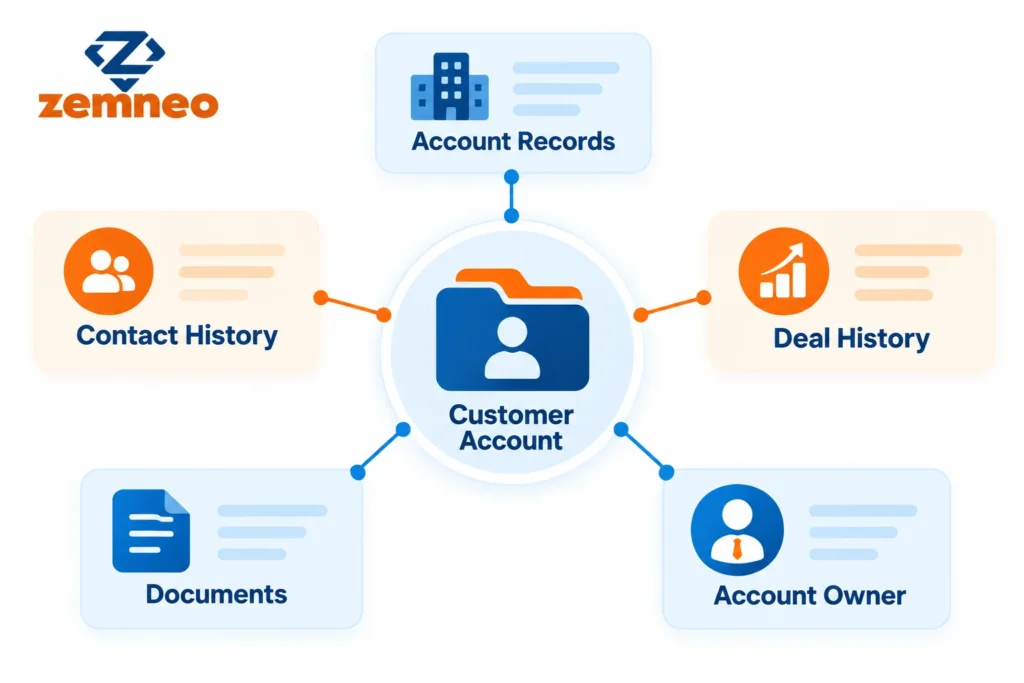
Good CRM account management usually pulls together a few different pieces of information that would otherwise live in separate places, and most of it is simpler to gather than teams expect once they know exactly what to look for.
Basic account details: company name, industry, size, and current status, so anyone can understand who the customer is at a glance.
A running conversation history: every call, email, and message tied to that account, arranged in order, so context is never lost between team members.
Orders and open deals: what has already been purchased, plus anything currently being negotiated or quoted.
Files and internal notes: contracts, agreements, and any private notes your team needs to remember about how this customer prefers to work.
A named owner: one clear person responsible for the account, so there is never a moment where everyone assumes someone else is handling it.
None of these pieces are complicated on their own. The value comes from having them all connected to the same account instead of scattered across different systems, where nobody has the time or patience to go looking for them one by one.
Put these together, and CRM account management stops feeling like paperwork and starts acting like a second memory for your whole team.
What Changes Once Everything Lives in One Place
New hires get up to speed faster. A new sales rep can open an account and understand the full relationship within minutes, instead of needing a long handover conversation from whoever managed it before them.
Handoffs stop being risky. When someone goes on leave or leaves the company entirely, their accounts do not disappear into a black hole. Anyone else on the team can step in right away because the history is already sitting there.
Quiet accounts get noticed sooner. If a normally active customer suddenly stops responding or ordering, it shows up clearly in the account activity instead of going unnoticed for months at a time.
Upsell timing becomes obvious. Seeing a customer’s full purchase history in one screen makes it far easier to spot the right moment to suggest something related, rather than guessing or missing the window entirely.
Managers get real numbers instead of guesses. Questions like which accounts bring in the most revenue or which ones need attention stop requiring a scramble through spreadsheets and start being answerable in a few clicks.
Remote and hybrid teams stay aligned. When people are not sitting in the same office, a shared account record becomes the one place everyone can trust, no matter where or when they happen to be working.
Taken together, these small shifts are really what CRM account management is trying to deliver, less time spent searching, and more time spent actually serving the customer. None of these benefits show up overnight, but most businesses notice a difference within the first month, simply because fewer conversations start with the phrase “let me check and call you back.”
A Software Feature vs a Business Decision
A lot of businesses mix up CRM account management with the idea of giving extra attention to a small group of top clients. The two are related, but they are not the same thing.
CRM account management is a feature of your software. It applies to every account you have, large or small, and simply keeps information organized in one place. Choosing to give certain high value clients a dedicated point of contact, more frequent check ins, or custom pricing is a separate business decision your leadership team makes on top of that software, not something the CRM decides for you automatically.
In practice, most growing businesses end up using both. The CRM keeps every single account organized by default, and leadership then decides which accounts deserve extra, more personal attention based on revenue, potential, or how strategic that relationship is to the business.
A useful way to test which side of this you are dealing with is to ask a simple question. Is this something the software should track for every customer automatically, or is this a decision a manager needs to make about a specific client? The first belongs inside CRM account management. The second belongs to your business strategy.
Features Worth Looking For in Account Management Software
If you are comparing CRM options for CRM account management, a few things are worth checking before you commit, since not every tool handles account management the same way. It is easy to get distracted by flashy dashboards during a sales demo and forget to check whether the basics, like linking a contact to the right account automatically, actually work the way you need them to.
Records that connect to each other, not standalone contact cards sitting on their own. Look for contact management that ties people directly to the account or business they belong to.
Control over who sees what. Role based access matters more as your team grows, so sensitive account details are not visible to everyone by default.
Reminders that fire on their own. Automation should handle renewal alerts and follow-up nudges without anyone needing to remember on their own.
Deals visible right inside the account, not tucked away on a separate screen. Opportunity management should connect directly to the account record.
Reports you can actually read at a glance. Reports and dashboards should show account level activity without needing a spreadsheet built on the side.
ZemNeo’s own account management feature was built specifically around these gaps, so growing teams get one connected view instead of piecing it together themselves from five different tools.
Price matters too, obviously, but it is worth resisting the urge to pick the cheapest option purely on cost. A tool that saves your team an hour a day easily pays for itself within the first month, while a cheaper tool that still leaves data scattered ends up costing more in wasted time than it ever saved in fees.
A Simple Way to Roll This Out
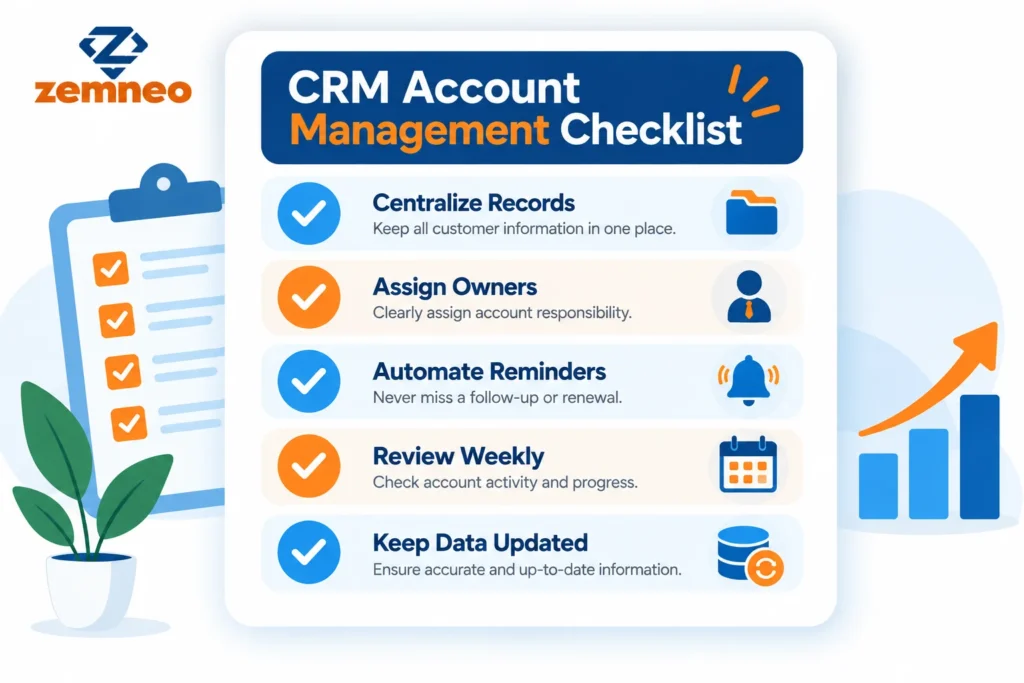
Setting up CRM account management does not need to be complicated. A workable order looks something like this. Most of the businesses we have seen get stuck not because the tools are hard to use, but because they try to do all five steps at once instead of moving through them one at a time.
Start with your messiest data first. Pull customer information out of whatever scattered spreadsheets or notes currently hold it, even if it is incomplete. You can clean it up gradually as you go along.
Give every account a name, not a department. Assign one person as the clear owner, so responsibility never turns into a group shrug when something gets missed.
Turn on a handful of automated reminders, starting with renewal dates and overdue follow-ups, rather than trying to automate everything on day one.
Put a recurring check in on the calendar. A short weekly or monthly review catches quiet accounts long before they turn into lost customers.
Treat updates as part of the job, not an extra chore tacked on at the end of the day. The moment updating a record feels optional, it quietly stops happening.
If you want to see how this fits into the bigger picture of running a CRM well, our post on what the primary objective of the CRM process is is a useful next read.
Where Businesses Usually Go Wrong
Even businesses that set out to do CRM account management properly can fall into a few predictable traps along the way.
Leaving ownership vague. If two people both assume they are responsible for an account, in practice nobody actually is, and the account quietly falls through the cracks.
Importing the mess along with the data. Duplicate entries and outdated details carried over from old spreadsheets just relocate the problem instead of actually solving it.
Building it once and forgetting it. Some teams set everything up carefully in the first week and never touch it again, which defeats the purpose of having it at all.
Turning it into a report nobody checks. Dashboards only help a business if someone actually looks at them regularly and acts on what they show.
Assuming one big cleanup fixes everything permanently. Data quality slips again within a few months if nobody owns the ongoing job of keeping records accurate, even after the initial cleanup was done properly.
Final Thoughts
None of this requires expensive software or a dedicated data team. CRM account management, at its core, is really just a decision to stop letting customer knowledge live inside someone’s head or inbox, and start keeping it somewhere your whole team can rely on together.
Businesses that skip this step rarely notice the cost right away. It shows up slowly, in slightly slower response times, in accounts that quietly stop ordering, and in new hires who take months instead of weeks to feel confident talking to customers. By the time the pattern becomes obvious, a fair amount of avoidable damage has often already been done.
ZemNeo CRM was built to make that decision easy to act on, pulling account records, conversation history, and deals into one place so growing teams do not have to assemble it themselves from scratch. Start with your messiest accounts, get the basics right, and the rest of your customer relationships tend to fall into place around it.
There is no perfect moment to begin, and waiting for one usually just means the scattered spreadsheets keep piling up. Pick your ten most important accounts, move their information into one place this week, and let the habit grow from there. CRM account management works best when it is treated as an ongoing practice, not a project you finish once and never think about again.
FAQ’s
Q1: What is CRM account management in simple terms?
It means keeping all the information about a customer account, like contact details, past deals, and conversations, organized in one place inside your CRM instead of scattered across different tools.
Q2: Is CRM account management only useful for large businesses?
No. Small and mid sized businesses often benefit the most, since they have fewer team members to manually track every customer detail on their own.
Q3: How is CRM account management different from a simple contact list?
A contact list only stores names and numbers. CRM account management also connects that contact to their full history, including deals, conversations, and documents, in one linked record.
Q4: Does CRM account management replace key account management?
No. CRM account management is the system that organizes every account. Key account management is a strategy some businesses use on top of that system for their most valuable customers.
Q5: What information should be included in a CRM account record?
A good account record usually includes contact history, deal and order details, documents, notes, and a clear owner responsible for that account.
Q6: How long does it take to set up CRM account management?
Basic setup can take a few days for a small business, mainly spent moving existing customer data into the CRM and assigning account owners.
Q7: Can CRM account management help reduce missed renewals?
Yes. When renewal dates are tied directly to the account inside the CRM, automated reminders can alert your team well before the deadline.
Q8: Who should be responsible for updating account records?
Usually, the assigned account owner updates the record after each interaction, though anyone on the team who speaks with that customer should add notes as needed.
Q9: What happens if a business skips CRM account management?
Information stays scattered across spreadsheets, emails, and personal notes, which usually leads to missed follow-ups, repeated questions to customers, and inconsistent service.
Q10: Is CRM account management difficult to learn for a new team?
Not usually. Most CRM platforms are built to be simple, and once account records are set up correctly, day to day use mainly involves checking and updating existing information.
More Tips to Grow Your Business
- How to Improve Sales Performance: 15 Tips for Better Sales Results
- Zemneo CRM or Salesforce CRM: Which Fits Your Business Better?
- What Is the Primary Objective of the CRM Process? 7 Benefits
- ZemNeo CRM vs Zoho CRM: Which Is Better for Indian SMBs?
- What is Customer Master Data Management? Explained: 7 Powerful Benefits
