Reports and Dashboards
CRM KPI Dashboard and Reporting Software
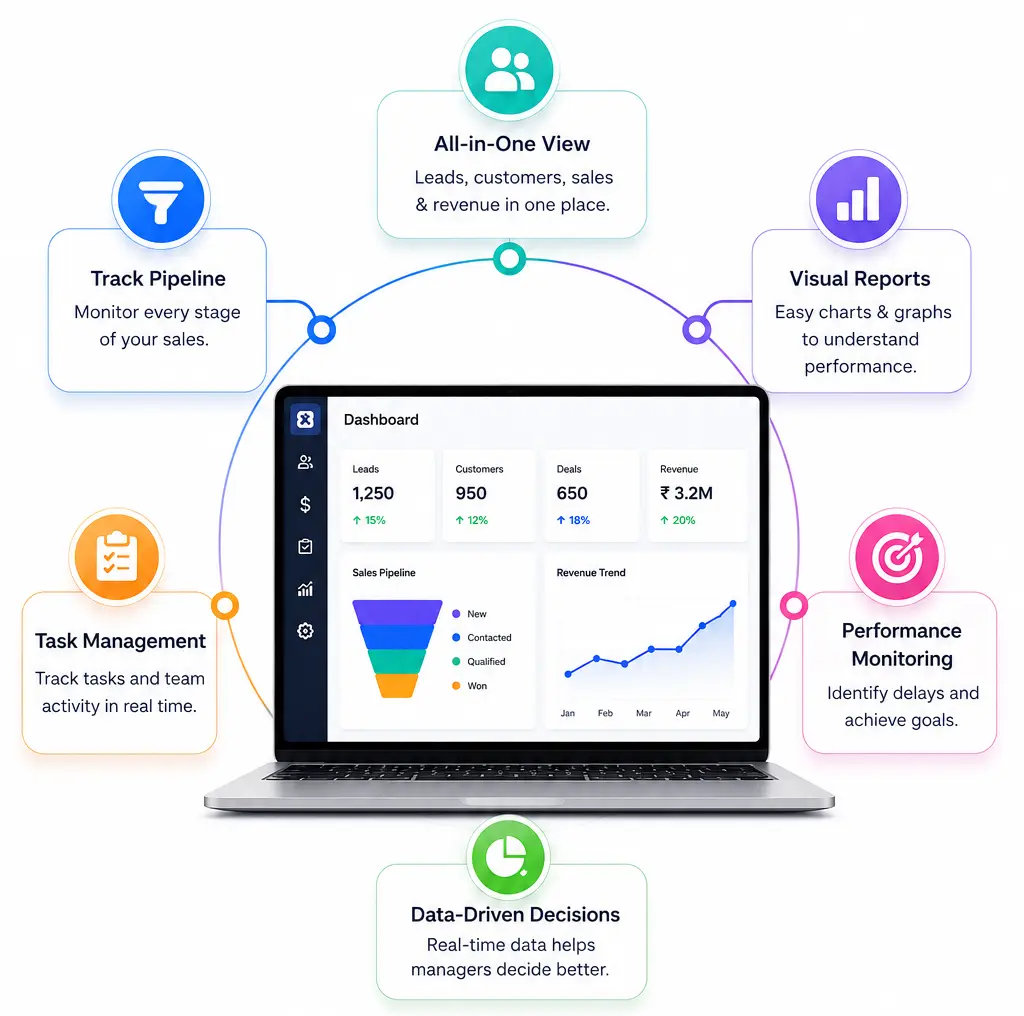
ZemNeo's CRM reporting and dashboard software turns leads, customers, payments, and team activity into clear, real time visuals, so managers always know exactly where to focus next. No more waiting on manual reports.
Connected Business Operations
What is CRM Dashboard?
A CRM dashboard turns raw business data into clear charts and visual reports that teams can understand at a glance. It tracks leads, customers, sales pipelines, tasks, and revenue from one place, giving managers real time visibility to monitor performance, spot delays early, and make informed decisions backed by accurate data.
A structured CRM KPI dashboard keeps information updated across every department, so reports and dashboards support better planning, faster decisions, and stronger control over daily operations. As your business grows, this same visibility helps leadership track long term performance without relying on manual spreadsheets.
Dashboard Features
Key Reporting & Dashboard Features
These CRM dashboard softwares are built around real business data, not just charts that look good on a screen.
Customer Insights Dashboard
Track active customers, churn signals, service usage, revenue contribution, and account value in one view, helping teams understand customer health and manage relationships better daily.
Revenue Forecast Dashboard
This sales analytics dashboard shows pipeline value by stage, expected revenue, movement trends, and closing probability, helping managers plan targets and guide sales actions confidently.
Performance Overview Dashboard
This CRM KPI dashboard summarizes conversions, closed deals, activity levels, and key metrics for any period, giving leadership a reliable snapshot of business performance instantly.
Why ZemNeo
Built for Better Business Visibility
Every business decision depends on accurate information. ZemNeo's CRM dashboards track leads, opportunities, tasks, payments, and performance in real time, so managers see trends, team activity, and business outcomes without manually preparing a single spreadsheet or report.
This gives your team faster decisions, stronger accountability, and better control over daily operations, whether you're managing one branch or several.


Dashboard Controls
Flexible Reporting & Dashboard Controls
Configure your ZemNeo CRM dashboard to match exactly what your team needs to track. Filter by branch, user, team, or date range, while keeping every number accurate and consistent across all departments.
-
Dashboards refresh automatically when new activity is recorded
-
Filter reports by team, branch, region, or individual user
-
Export reports in PDF, Excel, and CSV formats anytime
-
Schedule automatic report delivery to managers and teams
Dashboard Benefits
How DashboardsImprove Team Performance
Lead conversion tracking software built into these dashboards handles data collection and visualization automatically so teams can focus on decisions, follow-ups, and business activities instead of preparing reports manually.
-
Real Time Data
-
Faster Decisions
-
Clear KPI Tracking
-
Team Performance Views
-
Scheduled Report Sharing
-
Branch Wise Comparison

Got Questions? We’ve Got Answers
CRM dashboard examples show how business data like leads, deals, tasks, and payments can be displayed visually, helping teams monitor performance and make faster decisions without manual reporting.
A CRM KPI dashboard gives managers a real time view of team activity, pipeline movement, conversions, and overdue tasks so they can guide teams using actual data instead of assumptions.
Yes. Reports from this CRM reporting and dashboard software can be exported in PDF, Excel, or CSV formats, and scheduled for automatic delivery to selected users daily, weekly, or monthly.
Yes. Dashboards refresh automatically whenever new leads, stage updates, payments, or completed tasks are recorded, ensuring teams always work with current and accurate CRM sales analytics.
Yes. Filters allow detailed comparison across branches, teams, or individual users, helping leaders track productivity, identify gaps, and evaluate performance across regions or departments.