How Call Center CTI and Contact Center CTI Work: Features and Benefits
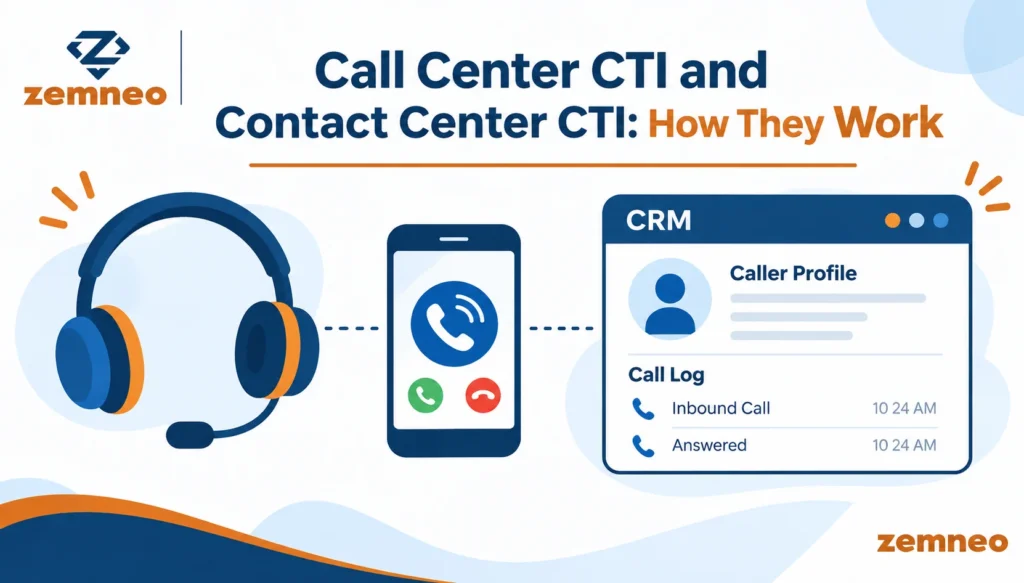
Call center CTI links your phone system to your CRM, so every call is matched to a customer, shown on the agent’s screen and logged without typing. Contact center CTI does the same job, but across more channels than voice. Both save agents time and stop customer details from getting lost between a call and the CRM.
If your team takes or makes calls all day, you have probably seen the problem. An agent picks up, asks “Who is this?”, searches three sheets, and writes notes later. Half of it never gets written. CTI fixes that gap, and in this guide we explain how it works, which features matter, and what to check before you pick a setup. We also show how ZemNeo handles it.
What CTI means for call centers and contact centers
CTI stands for computer telephony integration. In simple words, it connects the phone side of your business with the computer side. A small piece of software, often called a CTI connector, passes call details from the phone system to the CRM and back. If you want the basics first, our guide on what CTI is and how computer telephony integration works covers that in plain words. Here, we focus on how it behaves in a busy calling team.
Call center CTI
A call center mostly handles voice calls, inbound or outbound. It makes each of those calls faster and better recorded. The agent sees who is calling, dials from the CRM, and the call is logged when it ends.
Contact center CTI
A contact center handles voice plus other channels, such as email, chat and messaging apps. It still starts with the phone call, but the customer record also holds what happened on the other channels. So an agent who answers a call can see that the same person emailed yesterday. Many people use “cti call center” and “cti contact center” for the same idea, and the core feature set is similar.
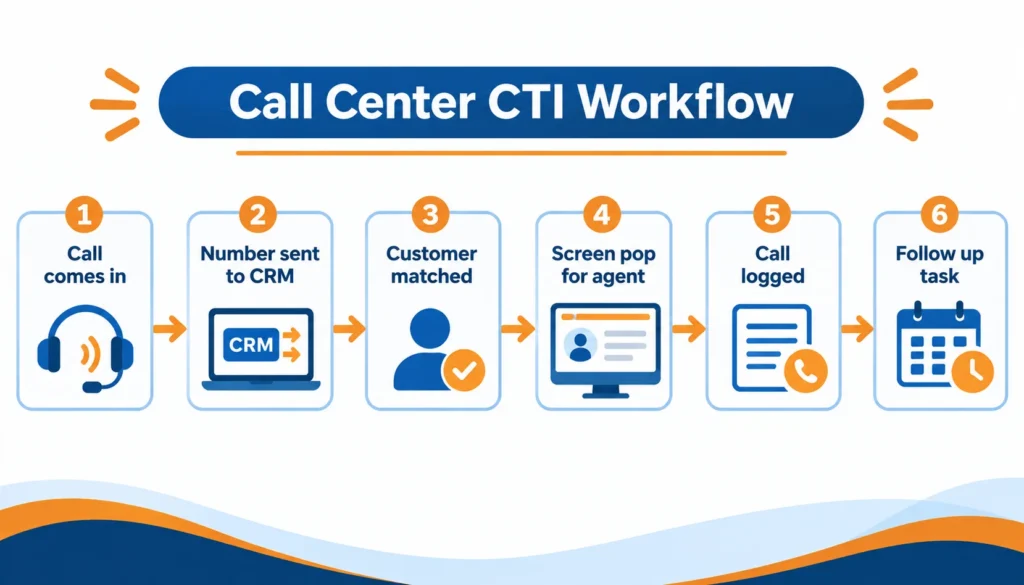
How CTI works, step by step
The flow is easy to follow once you see it in order.
- A customer calls, or an agent places a call.
- The phone system sends the caller’s number to the CRM through the CTI connector.
- The CRM matches the number to a lead, contact or account.
- The agent sees the customer’s details on screen while the phone rings or is answered.
- When the call ends, the CRM logs time, duration, direction and the agent’s name.
- The agent adds an outcome and next step, and a follow up task is created.
Nobody copies a number, and nobody tries to remember a conversation at the end of the day.
Outbound calling follows the same path in reverse. The agent clicks a number inside the CRM, the phone system dials it, and the call is logged against the same record. So a manager can see how many calls each agent made, how long they lasted and what came out of them, without asking anyone for a report.
Key features of call center CTI and contact center CTI
Different tools label these features differently, but these are the ones that decide if a setup helps or gets ignored.
Caller recognition and screen pop
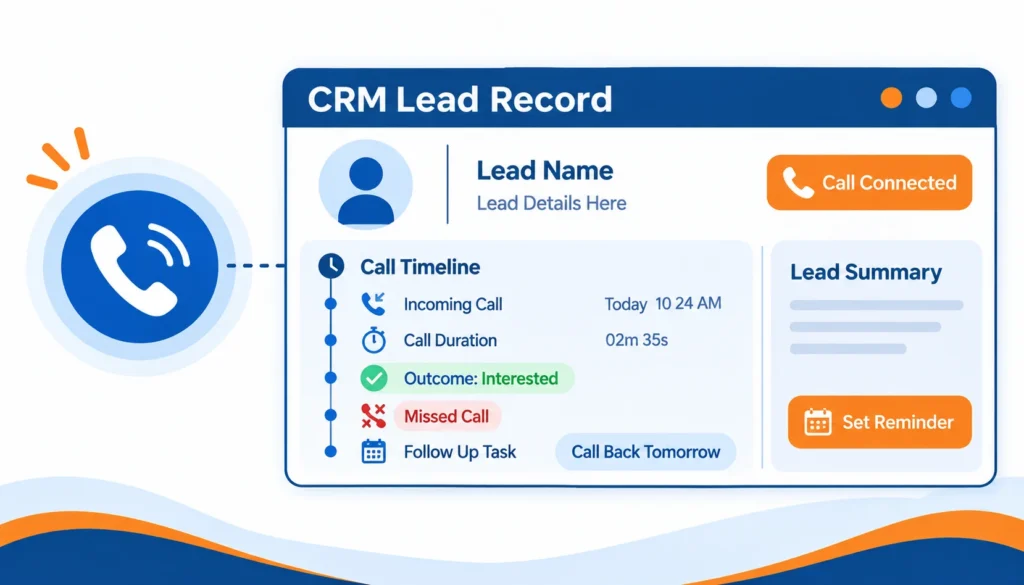
When a call arrives, the matching lead or contact opens on the agent’s screen. The agent can say the customer’s name and refer to their last conversation. This one feature makes calls feel personal.
Click to call
Agents call straight from a lead, contact or account record. There is no manual dialing, so wrong numbers drop.
Automatic call logging
Every inbound and outbound call is recorded with time, duration, direction and agent. Managers get a complete history without chasing anyone for updates.
Call outcomes and notes
After each call, the agent picks an outcome, adds a note and sets the next action. Standard outcomes across the team make reports far more useful.
Missed call alerts
A missed call is logged and flagged so someone calls back. This matters more than it sounds. Our post on why small businesses lose leads shows how often a missed call is where a sale quietly ends.
Call recording access
If your phone provider supports recording, the recording sits on the customer record. Teams use it for training and quality checks.
Benefits of CTI for calling teams
- Faster calls. Agents skip the search and the dialing.
- Cleaner records. Calls are logged automatically, so the CRM reflects what really happened.
- Fewer lost leads. Missed calls and follow ups are tracked, not remembered.
- Better coaching. Managers can review calls and see agent wise activity.
- Smoother handoffs. When a customer calls again, any agent sees the full history.
A good test: if a new agent can handle a returning customer’s call without asking them to repeat everything, your CTI is working.
Here is a simple example. Say a loan enquiry team of eight agents makes about 300 calls a day. Without CTI, each agent spends a few minutes per call searching for details and typing notes, and some calls are never logged at all. With CTI, the number is matched on ring, the note is a few clicks, and the manager sees all 300 calls at the end of the day. The time saved is spent talking to customers.
Call center CTI vs contact center CTI
| Call centers | Contact centers | |
|---|---|---|
| Main channel | Voice calls | Voice plus email, chat and messages |
| Customer view | Call history and details | Call history plus activity from other channels |
| Best for | Sales calling, collections, support lines | Support teams that serve customers on several channels |
| Core features | Screen pop, click to call, logging, recordings | Same features, plus a combined customer timeline |
Most small and mid sized teams start with the call side and add channels later. So begin with a CRM that logs calls well and keeps one timeline per customer.
How ZemNeo handles CTI
ZemNeo’s CTI CRM integration connects your business phone system with the CRM, so calls, caller details and follow ups sit in one place. Your telephony provider passes the caller’s number to ZemNeo through an API connection. ZemNeo then matches it to a lead, contact or account, shows the details to the agent and logs the call.
Here is what teams get:
- Automatic logging of inbound and outbound calls, with time, duration, direction, agent and outcome.
- Caller recognition that shows matched lead or contact details on screen.
- Click calling from lead, contact or account records.
- Missed call flags that can trigger tasks, reminders or alerts, which ties in with workflow automation in CRM.
- Call recordings linked to the right record, when your telephony provider supports recording.
- Role based access, so managers see team call activity while other users see only what their role allows. You can read more about role based access.
Because calls land inside the same CRM where your team handles lead management, a call is never a separate record that someone has to link by hand. ZemNeo works with compatible telephony providers through API connections, so check with the team that your current provider fits.
When a CTI contact center setup makes sense
Not every business needs a full CTI contact center on day one. If your team mostly makes and takes phone calls, a CRM that logs calls and shows caller details is enough. A wider CTI contact center setup starts to make sense when customers reach you on several channels and agents need one timeline for all of them. It also helps when you have branches or shifts, because the call history stays with the customer and not with one agent’s phone. Start small, prove that agents use it, then widen it.
What to check before you choose a CTI setup
Ask these questions before you commit to any CRM CTI integration.
- Does it work with your phone provider? This is the first thing to confirm. A great CRM is no use if it cannot connect to your calling system.
- Are calls linked to the right customer? Test with a few real numbers, including customers with two phone numbers.
- What happens to missed calls? Look for flags, tasks or alerts, not just a log entry.
- Can you control access? Call recordings and customer details are sensitive. Role based permissions are not optional.
- Can managers see the numbers? Agent wise activity and call volume should be easy to find. Our guide on reports and dashboards explains how to read them.
- Will it suit your team size? CTI is not only for large call centers. Even a team of five gets value from calls being recorded against the right customer.
Mistakes teams make with CTI
Buying features nobody uses. Start with logging, screen pop and missed call alerts. Add more once the team uses these daily.
Skipping standard call outcomes. If every agent writes notes differently, reports turn messy.
Ignoring data quality. Screen pop works only when phone numbers are stored properly in the CRM. Clean your contacts first. Our guide on organizing customer data shows how to do that for a small team.
Treating telephony integration as an IT task only. The phone provider and the CRM team both need to be involved from the start, or the setup stalls on small details like number formats.
Not training agents. Spend an hour showing agents the new screen, or they will keep using their old notebooks.
Final thoughts
Call center CTI and contact center CTI solve the same basic problem: calls and customer records should live together. Start with the basics, which are caller recognition, click to call, automatic logging and missed call alerts, then add channels as your team grows. If you want your calls, leads and follow ups in one customizable CRM, ZemNeo is worth a look. You can see the details on the CTI CRM integration page, or book a demo from the homepage.
Frequently asked questions
1. What is CTI in a call center?
CTI in a call center connects the phone system with the CRM, so incoming calls are matched to customers, shown on screen and logged automatically.
2. What is the difference between call center CTI and contact center CTI?
The first focuses on voice calls. The second also brings in email, chat and messages, so agents see one combined customer history.
3. What features should call center CTI have?
Look for caller recognition, click to call, automatic call logging, call outcomes, missed call alerts and recording access when your provider supports it.
4. What is a CTI connector?
A CTI connector is the link that passes call details between your phone system and your CRM, so both always show the same information.
5. Is CTI only for large call centers?
No. Any sales, support or service team that handles customer calls can use it. The benefit is the same at any size, since every call is recorded against the right customer.
6. Does ZemNeo support CTI integration?
Yes. ZemNeo connects with compatible telephony providers through API connections and logs calls, shows caller details and flags missed calls. Contact the team to confirm your provider.
7. Can I listen to call recordings inside the CRM?
Yes, when your telephony provider supports recording. In ZemNeo, supported recordings are linked to the matching lead or contact record.
8. How do I know if my CRM supports CTI?
Check for call logging, click to call and caller recognition. Then confirm your phone provider can connect to it before you buy.
Latest posts from ZemNeo
- What Is a Client Reporting Dashboard? Examples and How to Build One (25 Nov 2026)
- How to Manage Sales Opportunities in CRM: A Step-by-Step Guide (25 Nov 2026)
- Smart Inventory Management Software: A Practical Guide for Growing Businesses (2 Nov 2026)
- What Is CRM Workflow Automation? How It Works and Why Your Business Needs It (28 Oct 2026)
- What Is a Travel Agency CRM? Features, Uses, and How It Works (23 Oct 2026)