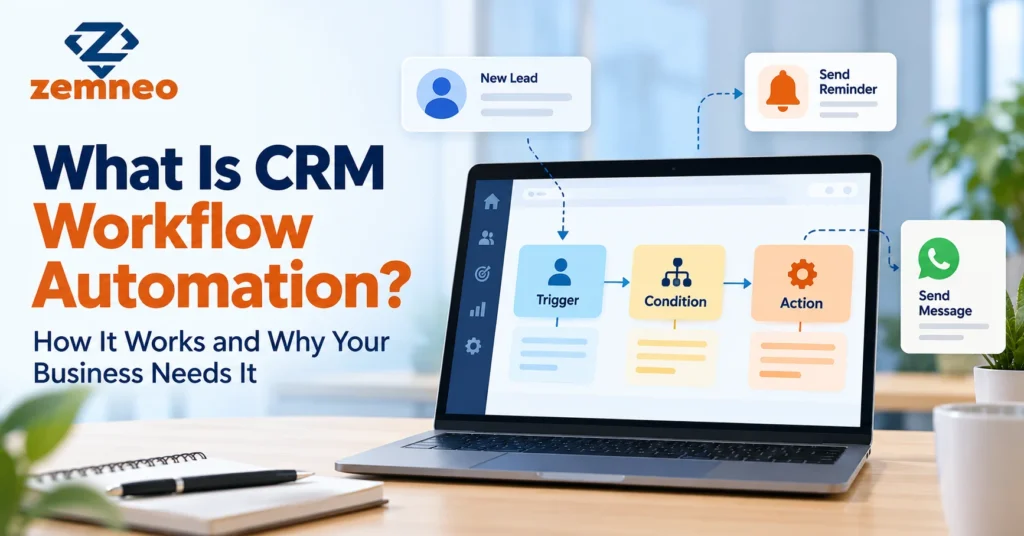
What Is CRM Workflow Automation? How It Works and Why Your Business Needs It
A new lead fills in your website form at 7 pm. Nobody sees it until the next morning. By then, she has already spoken to two other companies. Meanwhile, your sales rep spends the first hour of the day copying numbers from WhatsApp into a sheet and setting reminders on his phone, a few of which he will forget.
This does not happen because your team is careless. It happens because the same small tasks repeat a hundred times a week, and people get tired of doing them by hand. CRM workflow automation takes those tasks off their plate. It quietly handles the follow-ups, reminders and handovers that keep deals moving, while your people focus on real conversations.
In this guide, we explain what a CRM workflow is, how it works, which templates you can copy, and why it is worth setting up even for a small team.
What Is a CRM Workflow?
A CRM workflow is a set of rules inside your CRM that performs actions on its own when something specific happens. You define the rule once, and the system follows it every time.
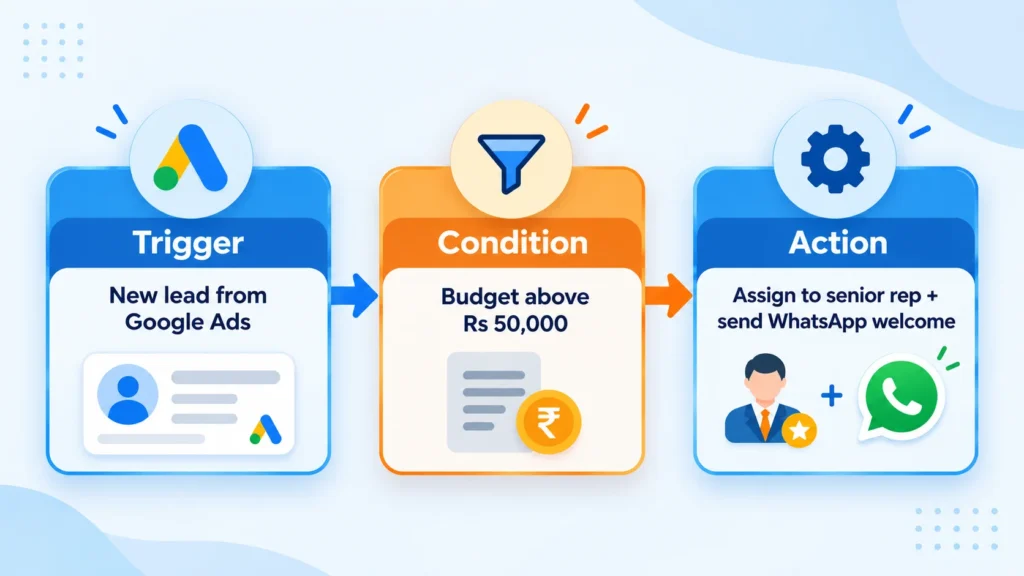
Every workflow follows one pattern:
Trigger > Condition > Action
Example: a new lead comes in from Google Ads (trigger). Its budget field is above Rs 50,000 (condition). The CRM assigns it to your senior sales rep and sends a WhatsApp welcome message (action).
CRM workflow automation is the practice of building many such rules, so routine work keeps moving without someone pushing it along.
Behind the scenes, the CRM keeps watching your records. Every time a lead is created, a field changes or a date arrives, it checks your rules. If a rule matches, it runs the actions in order and logs what it did on the record. That log matters, because your team can always see why a task appeared or why a message went out.
The Core Components of a CRM Workflow
Each workflow is made of five parts:
- Trigger: The event that starts it. Example: a deal moves to “Proposal Sent”.
- Condition: The filter that decides if it should run. Example: only when the deal value is above Rs 1 lakh.
- Action: What the CRM does. Example: create a call task for the account manager.
- Delay: The wait between steps. Example: wait two days, then send a reminder email.
- Owner: The person responsible when a human step is needed. Example: the team lead receives the escalation.
If one of these is missing, the workflow either fires at the wrong time or nobody acts on the result. Of the five, the owner is the part people forget most often. A reminder that nobody is responsible for is just noise.
Types of CRM Workflows
- Sequential: Steps run one after another, such as a welcome email, then a call task, then a feedback form.
- Rule-based: Records are routed by logic, such as sending all Jaipur leads to the Jaipur team.
- Scheduled: Actions run on a date or time, like a payment reminder five days before the due date.
- Multi-path: The flow splits into branches. If the customer opens the email, one path runs. If not, another one does.
- Parallel: Several actions happen together. When a deal is won, the CRM can alert accounts, create onboarding tasks and update the dashboard at the same moment.
You do not need to memorise these labels. Most real workflows mix two or three types. A payment reminder, for example, is scheduled, rule-based and sometimes multi-path when the customer replies.
Workflow vs Action vs Automation Rule
These three terms often get mixed up. Here is a quick comparison.
| Workflow | Action | Automation Rule | |
|---|---|---|---|
| What it is | A full sequence with logic | A single step | One “if this, then that” instruction |
| Example | A 14-day lead nurture series | Send one email | Assign leads by city |
| Number of steps | Many | One | One or two |
| Best for | Multi-stage processes | Quick one-off tasks | Simple routing and field updates |
Think of actions as building blocks, automation rules as small recipes, and a workflow as the complete meal.
Why Your Business Needs CRM Workflow Automation
Many owners think automation is only for large companies with big IT teams. In practice, small and mid-sized businesses feel the pain of manual work faster, because the same few people handle sales, support and billing.
Here are clear signs your business is ready:
- Leads from WhatsApp, Facebook, Google Ads and your website land in different places, and some never get a reply.
- Reps keep follow-up dates in their heads, notebooks or phone alarms.
- When someone goes on leave, their customers go quiet too.
- Payment reminders and renewal calls happen only when someone remembers.
- You cannot tell which deals are stuck, and why, without asking around.
- New hires take weeks to learn “how things are done here”.
If two or more of these sound familiar, it is time to act. The good news is that you do not need to automate everything at once. Fixing just the lead response and follow-up steps often makes a visible difference quickly.
Key Benefits
- Faster lead response. Instant assignment means a lead can hear from you in minutes, not the next morning. Buyers who enquire with several companies often go with whoever replies first, so speed is a real edge.
- Hours saved every week. If a rep spends 5 minutes logging and scheduling each of 20 follow-ups a day, that adds up to over 8 hours a week. CRM workflow automation gives most of that time back.
- Fewer missed follow-ups. Reminders no longer depend on someone’s memory.
- A consistent customer experience. Every customer gets the same welcome, the same updates and the same timing.
- Cleaner data. Required fields and automatic updates cut down on half-filled records. When a deal is won, the CRM can update the stage, date and owner without anyone typing.
- Clear accountability. Every task has an owner and a due date.
- Better visibility. Managers see what is pending without chasing people on calls.
- Easier scaling. A new rep follows the same process from day one.
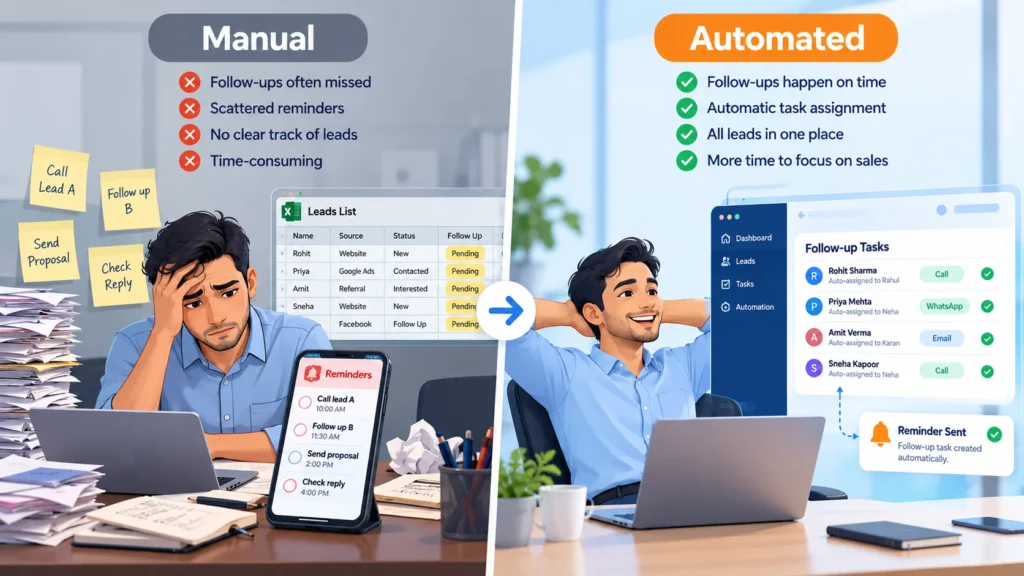
Most of these gains start with good lead management, because a workflow can only act on leads that are captured properly in the first place.
12 CRM Workflow Templates You Can Use
These CRM workflow examples cover sales, onboarding, billing and support. Pick the ones that fix your biggest headaches and set them up in ZemNeo.
| # | Workflow | Trigger | Condition | Action |
|---|---|---|---|---|
| 1 | Lead assignment | New lead created | Source or city matches | Assign to the right rep and notify them |
| 2 | Instant welcome | New lead created | Phone number present | Send WhatsApp or SMS welcome message |
| 3 | Callback reminder | Call logged | Outcome is “Call back” | Create a task for the chosen date |
| 4 | Stale lead alert | No activity for 3 days | Lead is still open | Notify the owner and the manager |
| 5 | Deal stage follow-up | Proposal sent | Deal value above your limit | Create a follow-up task in 2 days |
| 6 | Won deal handover | Deal marked Won | Any deal | Create onboarding tasks for the delivery team |
| 7 | Customer onboarding | New customer added | Plan type selected | Send a 7-day welcome email series |
| 8 | Payment reminder | Invoice due date near | Status is unpaid | Send reminders 5 days and 1 day before |
| 9 | Renewal alert | Contract ends in 30 days | Customer is active | Assign a renewal task to the account manager |
| 10 | Ticket escalation | Ticket opened | Unresolved after 24 hours | Raise priority and alert the team lead |
| 11 | Feedback request | Order delivered or ticket closed | Any | Send a short feedback form after 1 day |
| 12 | Lost lead nurture | Lead marked Lost | Reason is “Budget” | Add to the monthly offers list |
How to choose your first templates: Start where money leaks. If leads go cold, begin with templates 1, 2 and 4. If payments get delayed, start with template 8. If customers complain about slow support, template 10 gives the quickest relief.
Templates 2 and 8 work well over text messages. Our post on how CRM SMS integration improves follow-ups explains this in detail. For template 5, it helps to have clear deal stages, which our opportunity pipeline management guide walks through.
Step by Step: Build Your First Workflow in ZemNeo
ZemNeo is a customizable CRM, so your workflow can follow your own sales steps instead of a fixed template. Let us set up a simple workflow: every Facebook lead goes to Riya and gets a WhatsApp reply within minutes.
- Write the process on paper first. One line is enough: “Facebook lead, assign to Riya, send welcome message, call within 2 hours.”
- Open the automation section and create a new workflow. ZemNeo’s automation feature handles lead auto-assignment and follow-up reminders. [Screenshot: new workflow screen in ZemNeo]
- Pick the trigger: “New lead created”.
- Add the condition: Lead source is Facebook.
- Add the actions: Assign to Riya, send an approved message template through WhatsApp CRM integration, and create a call task due in 2 hours. [Screenshot: trigger, condition and action setup]
- Test it with a dummy lead. Check that the assignment, message and task all show up correctly.
- Switch it on and review after a week. Look at response times and adjust the delay if needed.
A few tips while you build: name each workflow clearly, such as “FB Lead – Assign and Welcome”, so anyone can understand it later. Keep message templates short and personal by using the lead’s first name. And if you sell in more than one city or product line, create separate conditions instead of one giant rule.
Once this works, grow your CRM workflow automation one rule at a time. Small wins build trust in the system.
How AI Is Changing CRM Workflows
Regular rules do exactly what you tell them. AI adds a layer that learns from your data.
- Smart lead scoring: Ranks leads by how likely they are to buy, based on past deals, source and engagement.
- Auto replies: Drafts responses to common questions, so reps only review and send.
- Predictive follow-ups: Suggests the best time to contact someone, based on when they usually reply.
- Data clean-up: Flags duplicate contacts and missing fields before they break your rules.
A practical way to start is to let AI suggest, not act. For example, let it score leads and show the score to reps, but keep assignment rules in your hands until you trust the results.
Keep a person involved for pricing, complaints and sensitive conversations. AI works best on top of clean data and well-planned CRM workflow automation, not as a replacement for it.
Best Practices for Designing CRM Workflows
- Start small: Good CRM workflow automation begins with the one task your team complains about most.
- Test before going live: Use sample records, not real customers.
- Monitor closely: Check results every week for the first month.
- Document every workflow: Note its name, trigger, owner and purpose.
- Review every quarter: Turn off anything nobody uses.
- Write messages like a human: Automated does not have to mean robotic. Use names, short sentences and a clear next step.
- Give every workflow an owner: One person should check that it still works as expected.
- Keep your team in the loop: Tell reps what the system now does for them, so they do not repeat the same task by hand.
If tasks created by workflows still pile up, read our guide on how to keep track of team tasks and avoid missed deadlines.
Common Mistakes to Avoid
Most problems with CRM workflow automation come from setup, not software.
- Over-automation: Five messages in a day will annoy customers, not win them.
- Duplicate triggers: Two workflows on the same event send double emails.
- No owner assigned: Alerts that go to nobody get ignored.
- Bad data: Wrong phone numbers mean failed messages, however good the workflow is.
- Set and forget: Your sales process changes, so your rules need to change too.
- Ignoring customer timing: Messages at 11 pm or on festival mornings feel careless. Set sending windows.
- Not telling the team: If reps do not know a workflow exists, they send duplicate messages manually.
How to Measure Workflow ROI
Use this simple formula:
Workflow ROI (%) = ((Value gained – Cost) / Cost) x 100
Value gained = (hours saved x hourly cost) + extra profit from faster follow-ups.
Example: Your CRM workflow automation saves 30 hours a month at Rs 300 an hour, which is Rs 9,000. Faster replies win two extra deals worth Rs 10,000 profit each, which is Rs 20,000. Total value is Rs 29,000. If the CRM and setup cost Rs 8,000 a month, ROI is ((29,000 – 8,000) / 8,000) x 100 = 262.5%.
Also track lead response time, follow-up completion rate and conversion rate. A good dashboard makes this easy, and our post on reports and dashboards explains which one to use when.
One more tip: measure before you switch anything on. Note your current average response time and follow-up rate for two weeks, then compare after a month. Without a “before” number, it is hard to prove what changed.
Final Thoughts
CRM workflow automation is not about replacing your sales team. It is about letting them spend time on conversations instead of copy-paste work. Start with one or two templates in ZemNeo, measure the results, and build from there. The goal is a system where no lead waits and no promise slips through.
Want to see how this works with your own process? Book a free demo of ZemNeo and our team will help you set up your first workflow.
Frequently Asked Questions
1. What is CRM workflow automation in simple words?
CRM workflow automation means setting rules in your CRM so routine tasks like lead assignment, reminders and follow-up messages happen on their own when a set event occurs.
2. How do I create a workflow in a CRM?
Choose a trigger, add a condition, then set one or more actions. Test it with a sample record before switching it on for real customers.
3. What are some CRM workflow examples for small businesses?
Common examples are automatic lead assignment, WhatsApp welcome messages, callback reminders, payment reminders, renewal alerts and feedback requests after delivery.
4. What is the difference between a workflow and an action in CRM?
An action is a single step, like sending one email. A workflow is a sequence of actions joined by triggers, conditions and delays.
5. What are the main types of CRM workflows?
The main types are sequential, rule-based, scheduled, multi-path and parallel workflows. Most businesses use a mix of these.
6. How does CRM workflow automation improve sales productivity?
It removes manual data entry and reminder setting, so reps spend more time selling. Leads also get faster replies, which usually improves conversion.
7. Can CRM workflows send WhatsApp messages automatically?
Yes, if your CRM supports WhatsApp integration. ZemNeo can send approved message templates for welcomes, order updates and payment reminders.
8. Is CRM workflow automation suitable for a small team?
Yes. Small teams often benefit the most because each person handles many roles. Even two or three simple workflows can save several hours a week. Start with lead assignment and follow-up reminders, since those usually save the most time.
Latest Posts from ZemNeo
- How to Keep Track of Team Tasks and Avoid Missed Deadlines
- Reports and Dashboards: What Is the Difference and How Do They Work?
- Zemneo vs Traditional ERPs and CRMs: Which One Is Best?
- How Does Retail CRM Software Support Retail Businesses? Key Features Explained
- What Is CTI? Computer Telephony Integration Explained