
How to Keep Track of Team Tasks and Avoid Missed Deadlines
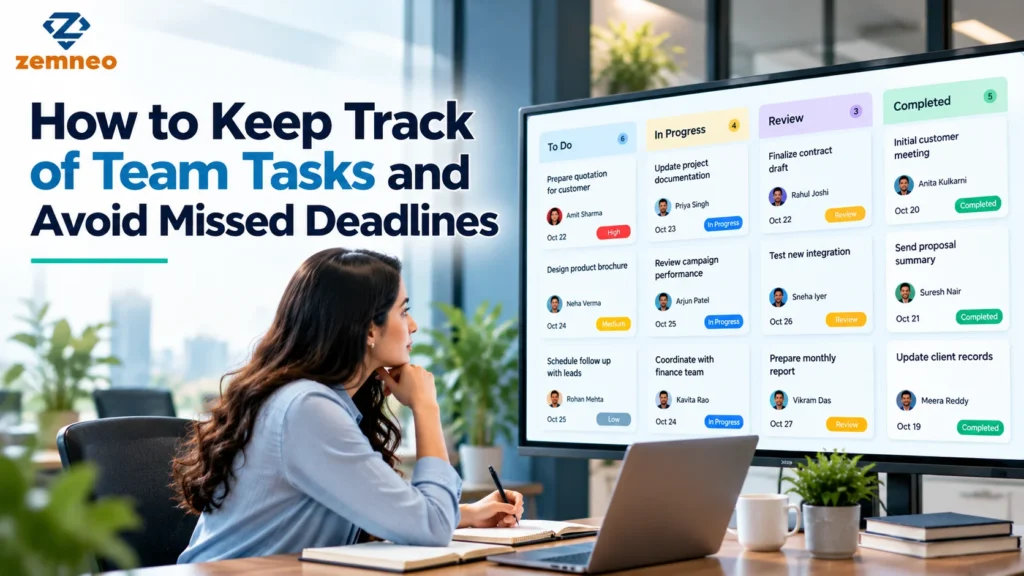
Every team has work that needs to be completed, deadlines to meet, and responsibilities to manage. Problems start when employees are unsure who owns a task, managers cannot see what is pending, or important follow-ups get lost in emails and chat messages.
A missed task may seem like a small issue. But if it involves a customer callback, an overdue quotation, an internal approval, or a project deadline, the delay can affect other people and their work.
The solution is not to ask employees for updates throughout the day. Teams need a clear process for assigning work, setting priorities, recording progress, and identifying delays before they become bigger problems.
This guide explains how to keep team tasks organised, reduce missed deadlines, and decide when task management software can help.
Why Do Team Tasks Get Missed?
Tasks are often missed because the process is unclear, not because employees deliberately ignore their responsibilities.
For example, a manager may assign work during a meeting but forget to record it. An employee may receive a deadline in an email but fail to add it to their task list. Another team member may assume that someone else is handling a customer follow-up.
These situations become more common when a team relies on several disconnected tools.
Common causes include:
- Unclear ownership: Nobody knows who is responsible for completing the task.
- Missing deadlines: The task has no clear due date.
- Scattered information: Instructions and updates are spread across emails, messages, and spreadsheets.
- Changing priorities: Urgent assignments push existing work aside.
- Poor progress tracking: Managers cannot easily identify pending or overdue tasks.
- Weak handovers: Employees leave tasks unfinished when responsibilities change.
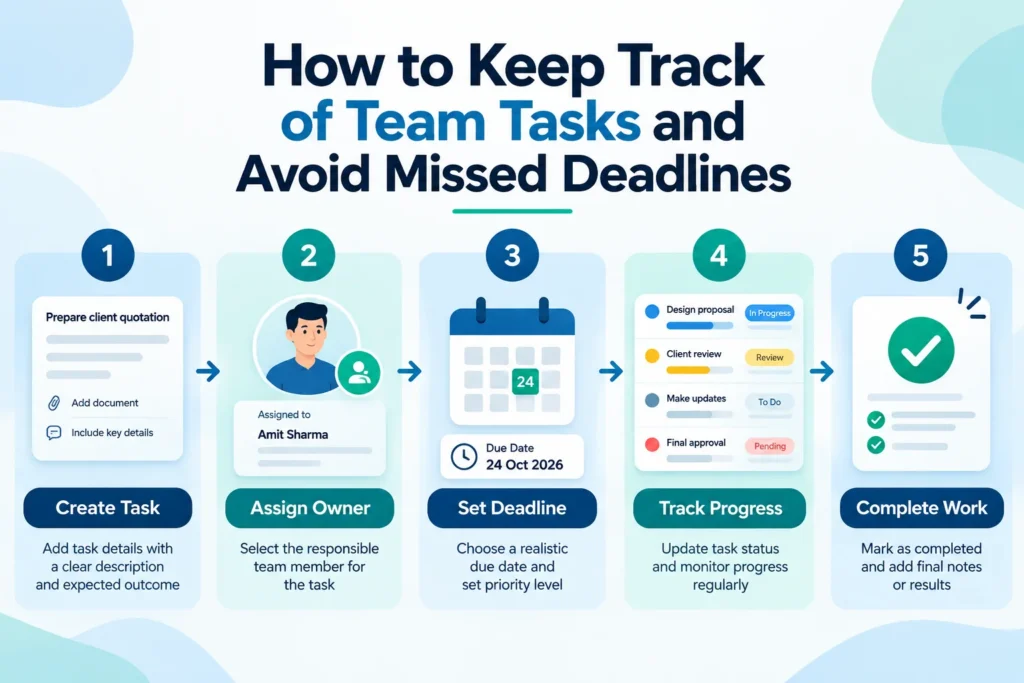
The first step is to make every important assignment visible. A task should have a clear purpose, a responsible person, a deadline, and a status that can be updated as work progresses.
1. Assign Tasks With Clear Responsibilities and Deadlines
A task description should explain exactly what needs to happen. Simply writing “Call customer” or “Prepare report” leaves too much room for confusion.
A better assignment explains the expected action and its deadline. For example, “Call the customer to discuss the quotation by Thursday” gives the employee a specific outcome to work towards.
Every important task should include:
- A clear task name and description
- One person responsible for completion
- A realistic due date
- A priority level
- A current status
- Relevant notes or supporting documents
If several employees contribute to the same assignment, decide who owns the final outcome and who is responsible for each supporting activity.
This is one of the main reasons businesses use a task management system. A shared record helps employees understand their responsibilities and gives managers a clearer view of assignments, deadlines, and progress.
It is also important to set realistic deadlines. If a task depends on information or approval from another department, include enough time for that dependency. An unrealistic deadline creates pressure without improving the process.
2. Keep Work Assignments in One Place
If employees have to check emails, chat messages, spreadsheets, and personal notes to understand their workload, tasks can easily be overlooked.
A shared task list gives the team one main place to check assignments and updates. When a deadline changes or a task is completed, the information should be updated there rather than left in an old message.
To keep work assignments organised, make sure employees can quickly answer these questions:
- What do I need to complete?
- Which tasks are most important?
- When is each task due?
- What is waiting for someone else?
- Which assignments have already been completed?
Small teams may be able to manage this through a shared spreadsheet or simple task board. As the number of employees and assignments grows, a more structured tool may be useful.
A suitable CRM and task management setup can bring task-related work into a wider business process, depending on the available features and configuration.
The important rule is consistency. If employees maintain separate lists that do not match the shared record, managers still will not have a reliable view of the team’s workload.
3. Prioritise Tasks and Manage Team Workload
A long task list does not automatically tell employees what to do first. Without clear priorities, people may complete easy assignments while important work remains pending.
A simple priority system can help teams decide where to focus.
| Priority | When to use it | Example |
|---|---|---|
| High | The task has an urgent deadline or significant business impact | Resolving an issue affecting an active customer |
| Medium | The task matters but can be scheduled | Preparing a weekly performance report |
| Low | The task can wait until more important work is complete | Updating an internal reference document |
Priority should reflect urgency, business impact, and dependencies. Not every new request should become an urgent assignment.
Managers should also review how much work each employee already has. Assigning five urgent tasks to someone who is already handling several deadlines may create delays across all their work.
When a new assignment arrives, consider whether existing work needs to be rescheduled or reassigned. This is a practical way to improve team productivity without expecting employees to work faster at every stage.
A good work management system should make pending assignments and their priorities easy to review. It should help the manager identify workload problems before they cause missed deadlines.
4. Track Progress and Identify Overdue Work
Assigning a task is only the beginning. Teams also need to know if the work has started, whether it is progressing, and if anything is preventing completion.
Use a small number of clear statuses, such as:
- Not started
- In progress
- Waiting for information
- Completed
A blocked status can also be useful when an employee cannot proceed without approval or input from someone else.
Review overdue tasks at agreed intervals. When a deadline passes, find out why the work is delayed. The reason may be an unrealistic deadline, unclear instructions, missing information, or an overloaded employee.
Avoid assuming that every overdue task is a performance problem. Sometimes the issue lies in the workflow itself.
For example, if several tasks are waiting for the same manager’s approval, the team may need a faster approval process. If tasks repeatedly remain incomplete because the next action is unclear, task descriptions may need improvement.
For work connected to sales, the Opportunity Management feature is relevant when a team needs to understand how opportunities progress and what activity is required next.
The purpose of progress tracking is to identify problems early enough for the team to respond, not simply to count overdue assignments.
5. Use Reminders and Automation Carefully
Employees often manage multiple assignments throughout the day. Even when tasks are recorded properly, an important deadline or follow-up can be forgotten.
Reminders can help by bringing attention to work that needs action. They are especially useful for approaching deadlines, scheduled callbacks, and tasks that have remained pending for too long.
However, too many alerts can become distracting. If employees receive notifications for every minor change, they may begin ignoring them.
Choose reminders based on the importance of the task. For recurring work, establish a repeatable process so the assignment does not depend on someone’s memory.
Some systems can also automate routine actions. For example, a workflow may create a follow-up task after a particular event or notify the responsible person when a deadline approaches. The exact options depend on the software and its configuration.
The guide to CRM workflow automation explains how automated rules can help manage repeatable business activities.
Automation should support a clear process. If the task owner, deadline, or trigger is poorly defined, automation may simply create more confusing assignments.
6. Connect Tasks With Customers and Business Activities
Tasks are often part of a larger process rather than independent pieces of work.
A sales opportunity, for example, may involve a product demonstration, a quotation, a follow-up call, and a final discussion. If each activity is recorded separately without a connection to the customer or opportunity, employees may struggle to understand what has already happened.
Connecting tasks with the relevant customer record or sales opportunity gives employees more context. They can review previous interactions, understand the purpose of the next action, and continue the work without asking the customer to repeat information.
This is particularly useful when assignments move between team members or when several departments work with the same customer.
Businesses can also improve continuity by maintaining organised customer information. The CRM account management guide explains why customer records and activity history matter when managing ongoing relationships.
The aim is to connect each task with the work it supports. Employees should be able to understand not only what they need to do, but also why the assignment matters.
7. Review Workload and Team Performance Regularly
Managers need visibility into team activity, but repeatedly asking every employee for updates can interrupt work.
A short daily check for urgent assignments, combined with a broader weekly review, may be more useful. The right frequency depends on the team’s workload and the deadlines involved.
During a review, check:
- Which tasks were completed?
- Which deadlines are approaching?
- Which tasks are overdue or blocked?
- Are some employees carrying too much work?
- Are tasks waiting for the same approval or information?
- Are the same delays happening repeatedly?
Use the answers to remove obstacles and improve the process. For example, if work regularly waits for one approval, the team may need clearer approval responsibilities or an alternative process for urgent cases.
Reporting can help managers identify patterns across tasks and employees. ZemNeo’s Reports and Dashboards feature describes ways to review CRM activity and performance information. The usefulness of any report depends on accurate records and the metrics available in the system.
Avoid measuring productivity only by the number of tasks completed. A team may complete many small tasks while important work remains unfinished. Review task outcomes, quality, and business impact alongside completion counts.
8. When Should a Business Use Task Management Software?
A basic task list may be enough for one person or a small team with a limited number of assignments. A dedicated tool becomes more useful when responsibilities are shared, deadlines overlap, and managers struggle to maintain visibility.
Consider using task management software when:
- Employees frequently forget follow-ups or miss deadlines.
- Managers spend too much time collecting status updates.
- Several people contribute to the same assignment.
- Work gets lost during employee handovers.
- The team needs a shared view of pending and completed tasks.
- Customer activities need to be connected with follow-up work.
For businesses already using a CRM, CRM and task management software can help connect customer enquiries, sales opportunities, and related activities with the work that follows. For example, an enquiry may lead to a scheduled callback, a quotation task, and a reminder to check the customer’s response.
ZemNeo’s Task Management feature is the main page to review when evaluating how task-related work fits into the platform. Businesses should assess whether the available functionality matches their processes and whether employees can maintain the records consistently.
Software does not automatically improve productivity. Clear ownership, sensible priorities, realistic deadlines, and regular updates are still necessary.
Common Task-Tracking Mistakes to Avoid
Even a shared system can fail when the team does not maintain it properly.
Creating vague tasks: Each assignment should describe the expected result, not just a broad activity.
Leaving deadlines undefined: Set a realistic due date whenever the work has a time requirement.
Assigning too much work: Check existing responsibilities before adding urgent tasks to an employee’s workload.
Ignoring status updates: Completed work should not remain marked as pending.
Sending too many reminders: Use notifications for meaningful events instead of every minor change.
Tracking activity without checking outcomes: Completing more tasks does not always mean that the team is achieving better results.
A useful task-tracking process should make work clearer, not add unnecessary administration. If employees find the process too complicated, simplify it until they can maintain it as part of their normal routine.
Frequently Asked Questions
1. How do you keep track of tasks at work?
Record tasks in one organised place, assign a responsible person, set a deadline, and update the status as work progresses. Review overdue and upcoming assignments regularly.
2. How can managers keep track of work assignments?
Managers can use a shared task list or task management system that displays ownership, deadlines, priorities, and status. Regular reviews help identify blocked work and uneven workloads.
3. How can a team avoid missed deadlines?
Use clear task descriptions, realistic deadlines, appropriate reminders, and regular progress checks. Investigate recurring delays instead of treating every late task as an individual problem.
4. What is the difference between task management and work management?
Task management focuses on individual assignments and their progress. Work management usually covers a broader process, including priorities, people, workflows, and how tasks fit together.
5. Can CRM software help with task management?
A CRM with task management capabilities can connect customer-related activities with assigned tasks, follow-ups, and relevant records. The available functions depend on the platform.
6. When should a small business use task management software?
It may be useful when assignments are frequently missed, several employees coordinate the same work, or managers spend too much time collecting updates manually.
7. How often should a team review tasks?
Urgent assignments may need daily attention, while a weekly review can help managers assess workload, recurring delays, and upcoming deadlines. The schedule should suit the team’s needs.
8. Does task management software automatically improve productivity?
No. Software can improve visibility and organisation, but productivity also depends on clear priorities, manageable workloads, accurate updates, and good communication.
Final Thoughts
Keeping track of team tasks starts with a simple process: record the work, assign ownership, set a deadline, and update progress. Teams also need clear priorities and a regular way to identify overdue or blocked assignments.
As the number of tasks grows, a shared task management system can reduce confusion and make responsibilities easier to understand. Connecting tasks with customer records and other business activities can provide useful context, while reminders and reporting can help teams respond to problems sooner.
The goal is not to monitor every minute of an employee’s day. It is to make important work visible, give each assignment a clear owner, and help the team complete the right work at the right time.
Five Recent ZemNeo Blog Posts
- How Does Retail CRM Software Support Retail Businesses? Key Features Explained
- What Is CTI? Computer Telephony Integration Explained
- ESP vs CRM: What’s the Difference and Why It Matters
- How Does School CRM Software Work? Features, Benefits & Guide
- How to Integrate Facebook and Instagram Lead Ads with ZemNeo CRM
Check the ZemNeo blog index before publishing to confirm that these are still the five most recently published posts.


