
What Is Workflow Automation in CRM? A Practical Guide for Small Businesses

What is workflow automation in CRM? It is the process of setting rules inside a CRM so that routine actions happen automatically when a specific event, condition, or time-based trigger occurs, instead of requiring a salesperson or manager to remember every step manually. For example, when a new enquiry enters the CRM, the system can assign it to the right sales representative, create a follow-up task, update the lead stage, and send an initial message without someone having to perform each action separately.
For a small business, this matters because CRM software should do more than store contact details. If your team still spends hours assigning leads, updating records, creating reminders, and checking which prospects need follow-up, the CRM is not doing enough of the repetitive work. Well-designed workflow automation connects these everyday tasks into a predictable process, helping sales teams respond faster, keep customer information updated, and spend more time on conversations that actually require human attention.
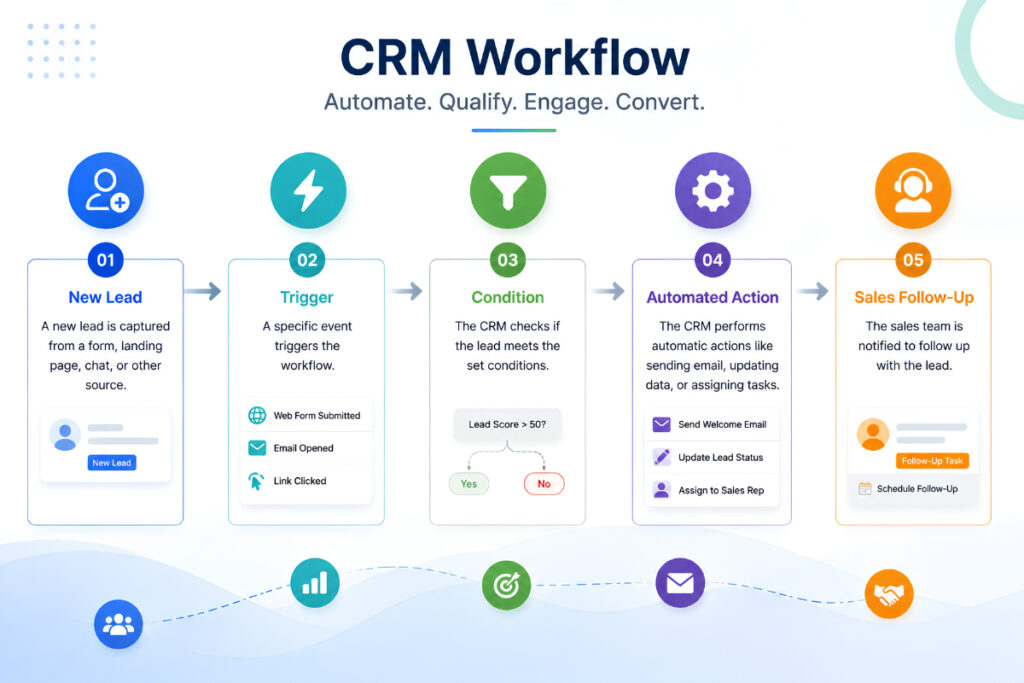
What Is Workflow Automation in CRM?
CRM workflow automation means configuring your CRM to perform predefined actions automatically when something happens in the system.
The basic logic is simple:
When something happens → check a condition → perform an action.
For example:
New enquiry received → lead source is website → assign sales representative + create follow-up task
Or:
Deal remains inactive for 7 days → deal is still open → notify sales manager + create follow-up task
The exact options depend on the CRM, but the purpose remains the same: remove repetitive manual steps from processes that follow predictable rules.
A CRM workflow should not replace every human decision. Instead, it should handle the mechanical parts of the process so your team can focus on qualification, negotiation, customer relationships, and other activities where judgment matters.
How Does CRM Workflow Automation Work?
Most CRM workflows are built around three core elements: a trigger, a condition, and an action.
1. Trigger
The trigger is the event that starts the workflow.
Common CRM triggers include:
- A new lead is created
- A contact submits an enquiry
- A deal moves to another stage
- A customer is added
- A task is completed
- A record is updated
- A lead becomes inactive
- A follow-up date arrives
For example, the trigger could be a new lead entering your CRM from a website form.
2. Condition
The condition determines whether the automation should run.
Suppose your business receives leads from several sources. You might want website leads to go to one sales team and leads from a specific campaign to go to another.
The workflow could check:
Lead source = Website
Only then does the next action take place.
Conditions make workflows more useful because the CRM does not have to perform the same action for every contact.
3. Action
The action is what the CRM does after the trigger and conditions are met.
Examples include:
- Assigning a lead
- Creating a task
- Sending a notification
- Updating a field
- Changing a lead stage
- Sending an automated message
- Creating a follow-up reminder
- Alerting a manager
A simple workflow might therefore look like:
New lead → Check source → Assign owner → Create task → Notify salesperson
Once configured correctly, this process can run repeatedly without someone manually managing every new record.
Why Do Small Businesses Need CRM Workflow Automation?
Small teams often have limited staff, which makes repetitive administrative work more expensive than it appears.
A salesperson who spends 10 minutes manually creating tasks for every new enquiry may not notice the problem with five leads a week. At 20, 50, or 100 leads, the same process becomes a serious drain on time.
Automation helps by taking care of repeatable tasks consistently.
Faster lead response
New leads can be assigned immediately instead of waiting for someone to check an inbox or spreadsheet.
Fewer missed follow-ups
The CRM can create reminders and tasks automatically based on dates, lead stages, or customer activity.
More consistent processes
Every new lead can follow the same basic process, reducing dependence on individual employees remembering every step.
Cleaner customer records
When fields and stages are updated automatically, teams are less likely to leave important records outdated.
Better sales visibility
Managers can see where leads and opportunities are in the pipeline without asking every salesperson for a manual status update.
More time for selling
The biggest benefit is often simple: salespeople spend less time on administrative work and more time speaking with prospects and customers.
For businesses already dealing with scattered enquiries, CRM automation can work alongside structured lead management to reduce the chances of opportunities being missed.
Common CRM Workflow Automation Examples
Workflow automation becomes easier to understand when you see how it applies to everyday business situations.
New lead assignment
Trigger: New lead enters CRM
Condition: Lead source is website
Action: Assign lead to the appropriate salesperson and create a follow-up task
This is useful when several sales representatives handle incoming enquiries.
Follow-up reminder
Trigger: Lead has been contacted
Condition: No follow-up completed after two days
Action: Create a reminder for the assigned salesperson
This prevents prospects from being forgotten after the initial conversation.
Deal stage automation
Trigger: Deal moves to proposal stage
Condition: Deal is still open
Action: Create a proposal follow-up task and notify the sales manager
This keeps the next step connected to the current stage.
Inactive lead re-engagement
Trigger: Lead has no activity for 14 days
Condition: Lead is still open
Action: Add the lead to a re-engagement workflow and notify the salesperson
This gives dormant prospects another opportunity to become active.
Customer onboarding
Trigger: Deal is marked as won
Condition: Customer is new
Action: Create onboarding tasks and notify the responsible team member
This creates a smoother transition from sales to customer service.
Renewal reminder
Trigger: Renewal date approaches
Condition: Account is active
Action: Notify the account manager and create a renewal task
This is particularly useful for businesses that work with subscriptions, annual contracts, maintenance plans, or recurring services.
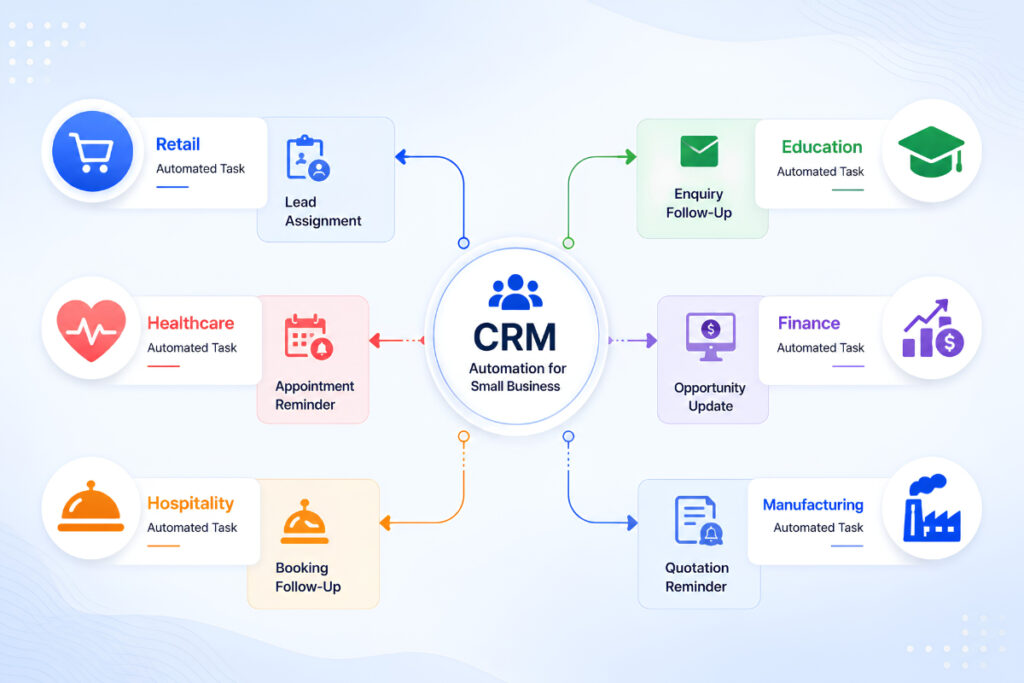
CRM Workflow Automation Across Different Industries
A useful CRM workflow is based on how the business actually operates. The same automation should not be copied blindly from one industry to another.
Retail
A retail business can use workflows to manage enquiries, assign sales staff, follow up with customers, and identify repeat purchase opportunities.
Education
Education businesses can automate enquiry assignment, admission follow-ups, application reminders, and communication with prospective students.
Healthcare
Healthcare businesses can use appropriate CRM workflows for appointment communication, enquiry handling, follow-up tasks, and customer relationship management, while making sure any workflow follows the relevant privacy and regulatory requirements.
Finance
Financial service teams can automate lead assignment, document follow-up reminders, opportunity stages, and scheduled customer interactions.
Hospitality
Hotels and hospitality businesses can use workflows for booking enquiries, customer follow-ups, service requests, and post-stay communication.
Manufacturing
Manufacturing companies can automate distributor or buyer enquiries, quotation follow-ups, sales tasks, opportunity updates, and account reminders.
A customizable CRM is particularly useful when different teams need different rules rather than forcing every department into the same workflow.
How to Create a CRM Workflow Step by Step
You do not need to automate everything at once. In fact, starting with too many complicated workflows can create more problems than it solves.
Step 1: Find repetitive tasks
Start by asking your team:
- What do you repeat every day?
- What tasks are often forgotten?
- Where do leads wait for a response?
- Which information is entered more than once?
- What reminders are currently managed manually?
These are your best automation candidates.
Step 2: Choose one clear objective
Every workflow should have a specific purpose.
For example:
Goal: Respond to every new enquiry quickly.
Then build the workflow around that goal instead of adding unrelated actions.
Step 3: Define the trigger
Decide exactly what starts the process.
For a lead workflow, it might be:
New lead created
For a follow-up workflow:
Deal has been inactive for 5 days
Step 4: Add conditions
Conditions prevent the workflow from applying the wrong action to the wrong record.
For example:
If lead source = Google Ads → assign to digital sales team
Step 5: Define the action
Choose what should happen automatically.
For example:
Assign lead → create task → notify salesperson
Step 6: Test the workflow
Always test an automation before applying it to your entire database.
Use a small number of records and check:
- Did the correct trigger fire?
- Was the right salesperson assigned?
- Was the task created?
- Was the correct field updated?
- Did the notification go to the right person?
Step 7: Monitor and improve
A workflow is not finished simply because it is activated.
Review whether it is actually helping the team. If salespeople receive unnecessary notifications or tasks are being created at the wrong time, adjust the rules.
When Should You Automate a CRM Process?
Not every CRM activity needs automation.
A good process for automation usually has three characteristics:
- It happens frequently.
- It follows predictable rules.
- It does not require significant human judgment.
For example, assigning a new lead based on location is usually a good automation.
Deciding whether a major customer is genuinely ready to sign a large contract is usually better handled by a salesperson.
This distinction helps prevent over-automation.
The goal is not to remove people from the process. The goal is to remove unnecessary work around the process.
What Should You Avoid Automating?
Automation can cause problems when the underlying process is unclear.
Avoid automating:
Unclear processes
If your team cannot agree on what should happen manually, automating the process will only make the confusion happen faster.
Every customer communication
Automated messages are useful for reminders and routine updates, but important conversations may need a real person.
Poor-quality data
If your CRM contains incorrect phone numbers, duplicate contacts, or outdated lead stages, automation may act on bad information.
Too many notifications
If employees receive alerts for every minor CRM event, they may start ignoring important notifications.
Complex workflows without testing
A workflow with many conditions and actions can become difficult to troubleshoot. Start simple and expand gradually.
How ZemNeo Supports CRM Workflow Automation
For a small business, workflow automation is most useful when it is connected to the rest of the sales process rather than operating as an isolated feature.
ZemNeo combines CRM capabilities such as lead management, task management, opportunity management, contact and account management, reports, dashboards, role-based access, and automation in one customizable system.
That means a workflow can support more than just an automated message. It can help move a lead through the sales process, assign responsibilities, create follow-up tasks, and give managers visibility into what is happening.
For example:
New enquiry → Lead created → Salesperson assigned → Follow-up task created → Opportunity updated → Manager sees pipeline activity
This type of connected process is useful for teams that want to manage customer follow-ups without Excel and keep sales activity in one place.
ZemNeo can also connect customer interactions from channels such as WhatsApp, Facebook, Instagram, Google Ads, SMS, CTI, and Tally, allowing businesses to build a more connected workflow around their customer data.
If your team is still relying heavily on spreadsheets, you may also find our guide on why Excel is not enough for lead management useful when deciding what to automate first.
Frequently Asked Questions
What is workflow automation in CRM?
Workflow automation in CRM is the use of predefined triggers, conditions, and actions to complete repetitive CRM tasks automatically. It can handle activities such as lead assignment, follow-up reminders, record updates, notifications, and customer onboarding.
What is a CRM workflow?
A CRM workflow is a defined sequence of actions that takes place when specific conditions are met. For example, when a new lead is created, the CRM can assign the lead to a salesperson and automatically create a follow-up task.
What are some CRM workflow examples?
Common examples include new lead assignment, lead follow-up reminders, deal stage updates, inactive lead re-engagement, customer onboarding, appointment reminders, support routing, and renewal alerts.
What is the difference between CRM automation and marketing automation?
CRM automation generally covers broader customer and sales processes, including lead management, pipeline activities, tasks, customer records, and follow-ups. Marketing automation focuses more specifically on activities such as campaigns, audience segmentation, lead nurturing, and marketing communications.
What should a small business automate first?
Start with repetitive, high-volume tasks that follow clear rules. Lead assignment, follow-up reminders, appointment notifications, customer onboarding tasks, and inactive lead alerts are usually good starting points.
Make Your CRM Work for Your Team
CRM workflow automation is most valuable when it solves a real operational problem. If your team repeatedly assigns leads, creates reminders, updates pipeline stages, or checks spreadsheets for pending follow-ups, those are strong signals that part of the process could be automated.
The best approach is to start with one workflow, measure its impact, and then expand. A well-designed automation can help your team respond faster, maintain cleaner customer records, and reduce the small administrative tasks that consume valuable sales time.
With ZemNeo, businesses can build customizable CRM workflows around their own sales process, manage leads and opportunities, automate tasks, connect communication channels, and monitor performance from a centralized dashboard. If you want to see how workflow automation could fit your business, consider booking a free ZemNeo demo and discussing the processes your team currently manages manually.


