How an ESP and CRM Are Used in Content Marketing

Understanding how an ESP and CRM are used in content marketing helps small businesses connect email campaigns with customer data and sales activity.
How an ESP and CRM are used in content marketing becomes much easier to understand when you stop treating them as competing tools and look at the different jobs they perform across the customer journey. An Email Service Provider, or ESP, is mainly responsible for delivering email content, managing subscribers, running campaigns, and measuring email engagement, while a Customer Relationship Management, or CRM, system keeps the broader customer and lead information organized so marketers can understand who they are communicating with, where each person is in the buying process, and what action should happen next.
For a small business, the real value comes from connecting these two functions rather than simply sending the same newsletter to everyone on a list. A CRM can tell the marketing team that one prospect downloaded a guide, another requested a quotation, and an existing customer has not purchased for several months. The ESP can then deliver content that matches those situations. That connection turns content marketing from a publishing activity into a practical way to educate prospects, nurture leads, support sales conversations, and retain customers.

What Is an ESP and What Is a CRM?
Before looking at the combined workflow, it helps to separate the responsibilities of each system.
What does an ESP do?
An ESP, or Email Service Provider, is designed to manage email communication at scale. It gives marketers the tools to build newsletters, promotional emails, educational sequences, welcome campaigns, and automated email journeys.
An ESP typically handles:
- Email list and subscriber management
- Campaign creation and scheduling
- Automated email sequences
- Email templates
- Audience segmentation
- A/B testing
- Delivery and bounce management
- Email engagement reporting
- Open and click tracking
In simple terms, the ESP is the delivery engine for email-based content. It helps a business get the right message into subscribers’ inboxes and provides data about how recipients respond.
What does a CRM do?
A CRM has a broader responsibility. It stores customer and prospect information and helps sales and marketing teams understand the relationship with each contact.
A CRM can contain information such as:
- Contact and company details
- Lead source
- Sales pipeline stage
- Previous conversations
- Tasks and follow-ups
- Purchase or opportunity information
- Customer interests
- Team ownership
- Notes and activities
- Engagement history
This distinction matters because content marketing does not happen in isolation. The content a person needs often depends on their relationship with the business.
A new lead may need an educational article. Someone comparing solutions may need a case study. A prospect who has already discussed pricing with sales may need a product comparison or implementation guide.
The CRM provides the context, while the ESP helps deliver the content.
How an ESP and CRM Are Used in Content Marketing
The strongest setup is a connected workflow in which customer information influences content distribution and the resulting engagement feeds useful information back into the customer record.
A practical process looks like this:
1. Capture the lead
A prospect may arrive through a website form, Google Ads, Facebook, Instagram, WhatsApp, or another marketing channel.
Instead of keeping this information in separate spreadsheets, the CRM records the lead and its source.
This is particularly useful for small businesses because the sales team can immediately see where the inquiry came from and assign responsibility for follow-up.
2. Understand the audience
The CRM helps marketers group contacts according to useful business information.
For example, a company might create segments for:
- New prospects
- Qualified leads
- Existing customers
- High-value opportunities
- Inactive customers
- Leads from a particular campaign
- Customers from a specific industry
The goal is not to create hundreds of complicated segments. It is to create groups that have different information needs.
3. Match content to the customer stage
Once the audience is organized, content can be matched to the buyer’s situation.
For example:
Awareness stage:
Educational blog posts, checklists, beginner guides, and industry insights.
Consideration stage:
Product guides, comparisons, case studies, webinars, and detailed solutions.
Decision stage:
Pricing information, demos, testimonials, implementation details, and product-specific content.
Customer stage:
How-to guides, onboarding resources, product updates, support content, and cross-sell information.
This is where CRM data makes content more useful. Instead of asking, “What email should we send this week?”, the team can ask, “What information does this group need next?”
4. Deliver the content through the ESP
The ESP then handles the actual email distribution.
A business might send a five-email educational sequence to new leads, a case study to qualified opportunities, and a product update to existing customers.
Automation makes this practical. The marketing team does not have to manually create and send an email every time a lead changes stage.
5. Track engagement
The ESP records email activity such as clicks, opens, bounces, and unsubscribes, depending on the platform and tracking setup.
That information becomes more valuable when it can be connected to the CRM.
For example, a sales manager may notice that a prospect repeatedly clicks content about a particular service. That activity can help the sales representative understand what the prospect is interested in before the next conversation.
Why CRM Data Makes Content Marketing More Relevant
One of the biggest weaknesses in basic email marketing is treating every subscriber as if they have the same needs.
A CRM helps remove that problem.
Imagine a small education business that receives inquiries for different courses. Sending the same email to every inquiry may create unnecessary noise. Instead, CRM information can separate students according to the course they asked about, their inquiry stage, and their previous interactions.
The ESP can then distribute course-specific guides, admission information, reminders, and useful educational content.
The same principle works in other industries. A manufacturing company may send technical product information to dealer prospects, while a retail business may send product recommendations to repeat customers. ZemNeo supports industry-specific CRM workflows for sectors including retail, education, healthcare, finance, hospitality, and manufacturing.
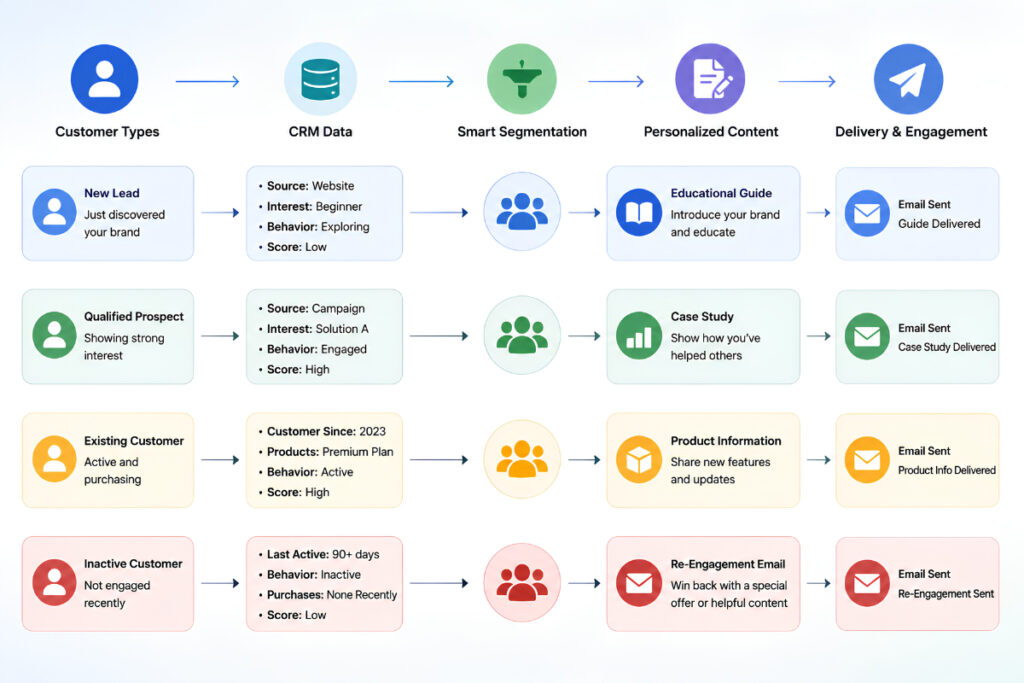
ESP and CRM Segmentation: A Practical Example
Consider a small software company with 1,000 contacts.
Instead of sending one monthly newsletter to all 1,000 people, the company could create four useful groups:
- New leads: Send introductory educational content that explains the problem the product solves.
- Active prospects: Send case studies, comparison content, and practical buying information.
- Customers: Send onboarding guides, product tips, and useful resources.
- Inactive contacts: Send a carefully planned re-engagement campaign.
The CRM stores the relationship and sales context. The ESP handles the communication.
This approach also prevents a common problem: sending sales-heavy content to people who are still learning about the problem.
How Automation Connects Content With Sales
Content becomes considerably more useful when it can trigger the next business action.
For example:
Website inquiry → CRM lead created → Lead assigned → Educational email sent → Prospect clicks product guide → Sales task created → Sales representative follows up
This workflow connects marketing activity with sales activity.
A CRM such as ZemNeo can automate lead assignment, follow-up reminders, and communication workflows, helping teams act on leads instead of relying on manual reminders. Its integrations can also connect channels such as WhatsApp, Facebook, Instagram, Google Ads, SMS, and calling systems with CRM records.
For a small sales team, that connection is important because a content interaction should not simply disappear into an email report. When an engagement signal is relevant to sales, it should help the salesperson decide what to do next.
What Metrics Should You Track?
Using an ESP and CRM together gives marketers a better view of content performance than email metrics alone.
ESP-level metrics
Track:
- Delivery rate
- Bounce rate
- Open rate, where reliable and appropriate
- Click-through rate
- Unsubscribe rate
- Engagement by campaign
- Performance by audience segment
CRM-level metrics
Track:
- Leads generated
- Qualified leads
- Lead-to-opportunity conversion
- Opportunity value
- Sales conversion
- Follow-up activity
- Revenue by source or campaign
The important step is connecting these measurements.
For example, an email may receive many clicks but generate very few qualified opportunities. Another campaign may receive fewer clicks but produce several serious sales conversations.
The second campaign may be more valuable to the business.
Common Mistakes Small Businesses Should Avoid
Using the ESP as a CRM
An ESP can manage subscribers and email activity, but it is not automatically a replacement for a complete sales CRM.
If sales conversations, opportunities, tasks, customer accounts, and follow-ups are being managed through spreadsheets and inboxes, the business is likely missing useful customer context.
Collecting too much data
More customer data does not automatically mean better personalization.
Only collect information that helps you make a better marketing, sales, or customer service decision. Keep fields accurate and remove outdated information regularly.
Sending too much content
Automation makes sending emails easier, but that does not mean customers want more emails.
A useful content strategy should answer a real question, solve a problem, or provide information that helps the recipient make progress.
Focusing only on email metrics
A 40% open rate does not matter much if the campaign produces no meaningful business outcome.
Connect engagement with pipeline activity and conversions wherever your systems allow it.
Keeping marketing and sales data separate
When marketing knows what content a prospect consumed but sales cannot see that context, the next conversation can feel disconnected.
A shared CRM record helps both teams work from the same information.
Can a Small Business Use a CRM Instead of an ESP?
Sometimes, yes, but it depends on the business’s requirements.
An ESP is particularly useful when email marketing is a major part of the strategy and the business needs specialized email campaign functionality, deliverability controls, and large-scale email sending.
A CRM becomes more important when the business needs to manage the broader customer relationship, including leads, opportunities, tasks, sales activities, accounts, and follow-ups.
Some platforms combine selected CRM and email marketing capabilities, so businesses should evaluate their actual workflow rather than choosing a tool based only on the category name.
For a growing small business, the practical question is simple: Do you only need to communicate with an email audience, or do you also need to manage the people and opportunities behind that audience?
How to Build a Simple ESP and CRM Content Workflow
If your current process is mostly spreadsheets and manual email sending, start small.
Step 1: Define your main audience groups
Choose three to five groups that genuinely receive different content.
Step 2: Map the buyer journey
Identify what information a person needs at awareness, consideration, decision, and customer stages.
Step 3: Connect lead sources to the CRM
Bring relevant inquiries into one system so marketing and sales can see the same customer information.
Step 4: Create a few useful content sequences
Start with practical campaigns such as a welcome sequence, lead-nurturing sequence, customer education series, or re-engagement campaign.
Step 5: Add sales actions
Decide which interactions should create a task, change a lead stage, or alert a salesperson.
Step 6: Review business results
Look beyond clicks and opens. Check which content helps generate qualified opportunities, move deals forward, and retain customers.
Frequently Asked Questions
What is the role of an ESP in content marketing?
An ESP manages the email side of content marketing. It helps businesses create, schedule, automate, deliver, and measure email campaigns such as newsletters, educational sequences, promotions, and lead-nurturing emails.
How does a CRM support content marketing?
A CRM provides customer and lead context. It stores information about contacts, interactions, sales stages, activities, and opportunities, allowing marketers to create more relevant audience segments and content journeys.
Can an ESP and CRM be used together?
Yes. In a connected setup, the CRM provides customer and sales information while the ESP delivers email content and tracks engagement. Together, they can support segmentation, personalization, nurturing, and sales follow-up.
What is the main difference between an ESP and a CRM?
An ESP primarily focuses on email communication and campaign management. A CRM manages the broader customer relationship, including contacts, leads, opportunities, sales activities, tasks, and customer history.
Is CRM and ESP integration useful for small businesses?
Yes, particularly when a business has enough leads and customers that manual tracking becomes difficult. Connecting the systems can reduce repetitive work and give sales and marketing teams better visibility into customer interactions.
Use CRM Data to Make Content More Useful
The main lesson is that an ESP and CRM should not be treated as two unrelated marketing tools. The ESP is responsible for delivering and measuring email content, while the CRM provides the customer context needed to decide what should be communicated and what the sales team should do afterward.
For small businesses, the best setup is usually the one that keeps the workflow practical. Instead of building complicated automation from day one, start with clean customer data, useful segments, a few relevant content sequences, and clear follow-up actions.
ZemNeo brings lead management, customer information, opportunity tracking, automation, reports, and multi-channel integrations into a customizable CRM environment, helping small businesses keep marketing and sales activity connected. If you want to see how a CRM workflow could fit your own sales process, you can book a free CRM demo with ZemNeo and discuss your requirements with the team


